A 4×6 photo measures 4 x 6 inches (10.16 x 15.24 cm, usually rounded to 10 x 15 cm). At 300 PPI — a common target for close-viewed prints — that is 1200 x 1800 pixels. A landscape 6 × 4 print has a 3:2 aspect ratio; the same sheet used vertically is 2:3. Check the actual file dimensions to see whether it needs a crop.
This guide covers every 4×6 measurement — inches, centimeters, millimeters, and pixels at each common resolution — plus how 4×6 compares to other print sizes, how to crop your photos to fit, and how to print sharp 4x6s at home. Use the calculator and crop example below to prepare a particular file.
4 × 6 pixel calculator
Formula: 4 × PPI by 6 × PPI. This calculates a target size; it does not add detail to a small original.
A 4 × 6 print can be horizontal or vertical. Choose portrait or landscape orientation before cropping so the subject and intended display determine which edge is longer.
See the 4:3 to 3:2 crop
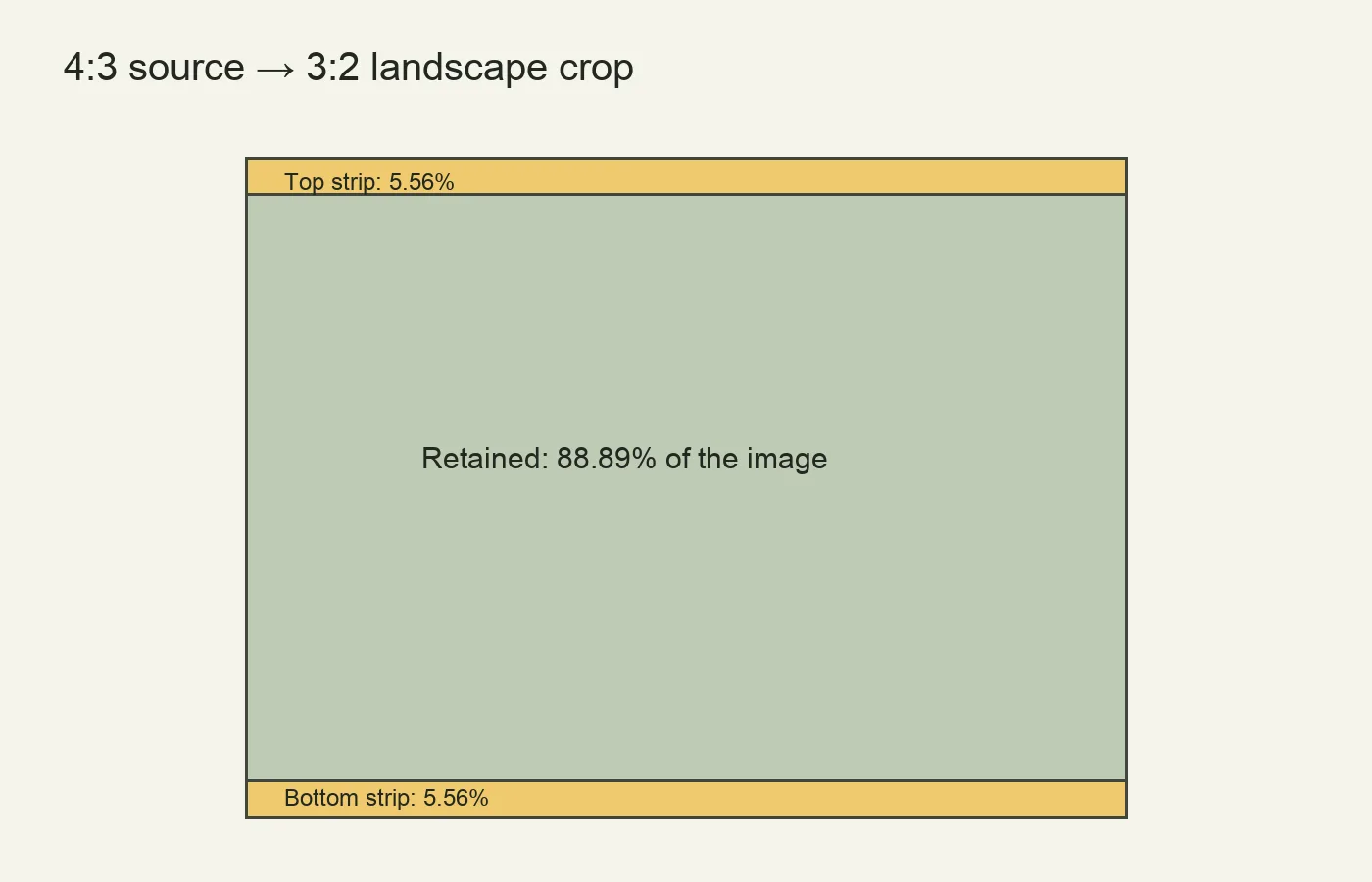
A 4000 × 3000 file becomes about 4000 × 2667 for a landscape 3:2 crop. For exact integer 3:2 dimensions within that file, use 3999 × 2666. Reposition the crop if a centered cut removes your subject.
Download the measured 4 × 6 outline and size comparisons (PDF, 2 pages). The 4 × 6 outline is defined at actual size; the comparison illustrations are labeled separately. Print at 100% (not “fit to page”) and measure the ruler to confirm your printer kept the size.
4x6 Photo Size at a Glance
| Measurement | 4x6 photo size |
|---|---|
| Inches | 4 x 6 in |
| Centimeters | 10.16 x 15.24 cm (≈ 10 x 15 cm) |
| Millimeters | 101.6 x 152.4 mm |
| Aspect ratio | 3:2 (long side is 1.5 times the short side) |
| Pixels at 300 PPI (common target) | 1200 x 1800 px |
| Area | 24 square inches |
Those are the numbers most people need; the rest of this page explains each one.
What Does "4x6" Mean?

The two numbers in "4x6" are the print's dimensions in inches: 4 inches on the short side and 6 inches on the long side. When width is listed first, 4 × 6 describes portrait orientation and 6 × 4 describes landscape. However, labs also use “4×6” as a product-size name for either orientation. Check the preview; it is the same sheet size either way.
Because the long side (6 in) is 1.5 times the short side (4 in), a 4x6 has a 3:2 aspect ratio. That matches the 24 × 36 mm image area commonly used for 35 mm still photography. A 3:2 file fits the matching landscape print ratio without a composition crop, though borderless expansion can still trim its edges. Other capture modes or later crops may produce a different ratio.
4x6 Photo Dimensions in Pixels

A digital file’s print size depends on its pixel dimensions and the chosen pixels per inch (PPI). Multiply inches by PPI to calculate the pixels needed. Printer DPI describes ink-dot placement and is a different specification; changing a PPI metadata number does not create image detail.
| Resolution | 4x6 in pixels | Best for |
|---|---|---|
| 72 PPI | 288 x 432 px | Very low detail at 4 × 6 inches; usually unsuitable for a close-viewed photo |
| 150 PPI | 600 x 900 px | Draft prints, flyers, low-cost lab prints |
| 300 PPI | 1200 x 1800 px | Standard high-quality photo prints |
| 600 PPI | 2400 x 3600 px | More pixels; useful only if the source and print workflow retain the detail |
For a close-viewed 4 × 6 print, 300 PPI, or 1200 × 1800 pixels, is a useful starting target. Follow the lab or printer’s specification. The source’s focus, detail and processing also affect the result; neither a 300 PPI label nor a larger file guarantees sharpness. Start with the best available original and inspect a proof when quality matters.
4x6 Photo Size in cm and mm
An exact 4 × 6-inch print measures 10.16 × 15.24 cm (101.6 × 152.4 mm). A true 10 × 15 cm sheet is slightly smaller. Labs sometimes use the names interchangeably, so check the actual finished dimensions when fitting a tight frame or mount.
Comparing 4x6 to Other Print Sizes
Seeing 4x6 next to other standard sizes makes it easy to pick the right print for the job. Note how the aspect ratio changes — that is what determines how much of your photo you keep or crop when you size up.
| Size (in) | Centimeters (rounded) | Aspect ratio | Typical use |
|---|---|---|---|
| 4 x 6 | 10 x 15 cm | 3:2 | Everyday snapshots, albums |
| 5 x 7 | 13 x 18 cm | 7:5 | Portraits, greeting cards |
| 8 x 10 | 20 x 25 cm | 5:4 | Framed portraits, desk prints |
| 8.5 x 11 | 22 x 28 cm | ~11:8.5 | Letter-size documents, flyers |
| 11 x 14 | 28 x 36 cm | 14:11 | Wall art, matted prints |
| 16 x 20 | 41 x 51 cm | 5:4 | Statement wall prints |
The sizes in this table have different aspect ratios. A 3:2 file also matches sizes such as 8 × 12 inches, so larger does not automatically mean a crop. A 5 × 7 or 8 × 10 does require a different crop or borders. Compare glossy and matte print finishes separately from the dimensions.
4x6 vs 5x7: What's the Difference?
A 5x7 (13 x 18 cm, 7:5 ratio) is larger and slightly squarer than a 4x6 (10 x 15 cm, 3:2). Because a 5x7 is not 3:2, a full-frame camera photo has to be cropped a little to fit it, whereas it fills a 4x6 with no cropping. Choose 4x6 for everyday snapshots and albums, and 5x7 for framed portraits and greeting cards.
How to Crop a Photo to 4x6
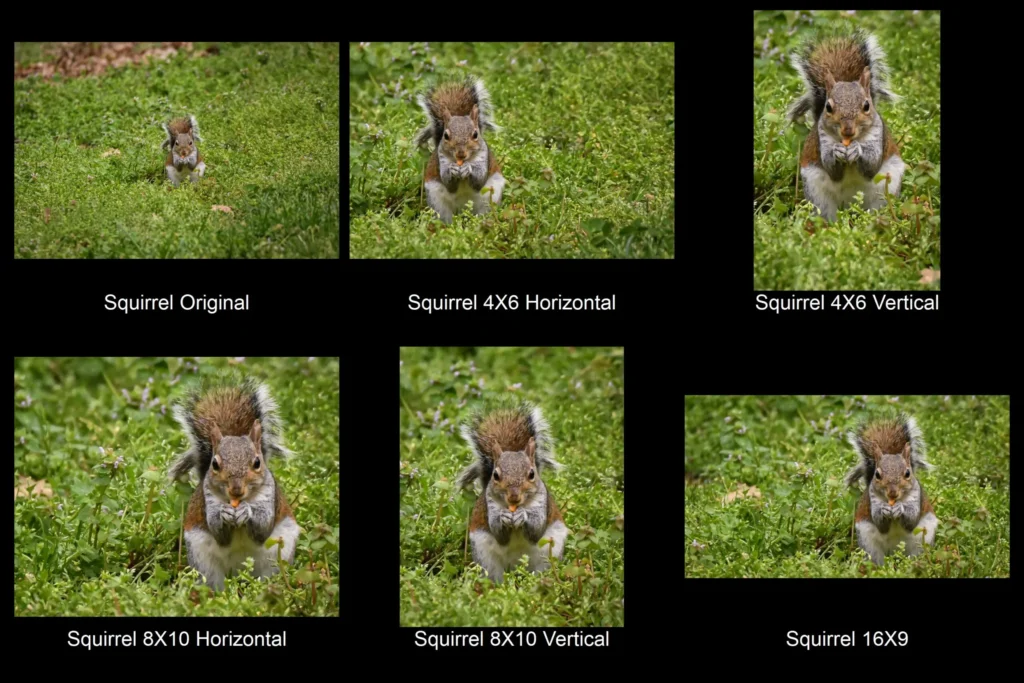
Check the file’s width and height rather than inferring its ratio from the device. A 3:2 landscape file matches a 6 × 4 print; a 4:3 file needs a crop or borders. Here is how to crop deliberately:
- Set your editor's crop tool to a fixed 3:2 (or 2:3 for portrait) aspect ratio so the frame stays locked to 4x6 proportions.
- Match the crop orientation to the print: wider-than-tall for a 6x4 landscape print, taller-than-wide for a 4x6 portrait print.
- Position the frame so you are not cutting off heads, hands, or important edges. Use a less restrictive crop if possible, or choose borders when the full subject cannot fit.
- Crop first, then export — cropping a photo you have already downsized throws away detail you cannot get back.
- Confirm the final file has 1200 × 1800 pixels for a 300 PPI target; inspect focus and source quality separately.
Fit the whole image or fill the paper?
For a 4000 × 3000 landscape image, filling a 6 × 4-inch print requires the 3:2 crop shown above. Fitting the whole 4:3 image without cropping instead gives a picture about 5.33 × 4 inches. On a 6 × 4 sheet, that leaves about one-third of an inch on each side if centered, before any printer-specific margins.
Neither option is automatically better. Choose fill when the crop removes only expendable space; choose fit when an important person or object would be cut off. A border can be a deliberate design choice. Do not stretch the image to eliminate the borders, because unequal scaling changes the subjects’ proportions.
Check effective PPI after the crop
Divide the remaining pixel dimension by the corresponding print dimension. A 1500 × 1000-pixel landscape crop printed at 6 × 4 inches has 250 PPI in both directions. A 900 × 600 file has 150 PPI. Changing either file’s resolution tag to 300 without resampling does not give it more pixels.
Adobe’s image-size documentation separates pixel dimensions, print size and resampling. If the source is small, first look for the original camera file rather than a messaging-app download or screenshot. Enlarging a copy can make the required file dimensions, but cannot guarantee recovery of genuine fine detail.
Diagnose a disappointing print before changing everything
- Soft detail: inspect the source focus and final pixel dimensions. More sharpening will not reliably fix a missed focus.
- Missing edges: compare your crop with the lab preview and any borderless expansion.
- Wrong physical size: check paper size, image size and print scaling separately.
- Unexpected color or darkness: check the lab’s file/profile instructions and correction option; judge a proof under suitable light.
Use the downloadable outline to check physical scale, and your actual photograph to check picture quality. A correctly measured rectangle proves the page was printed at the intended size; it does not prove that another image has sufficient detail or correct color.
How to print a 4 × 6 without unwanted cropping
- Set the document’s image area to 4 × 6 inches and crop intentionally to 2:3 or 3:2.
- Select the actual paper loaded in the printer. For a 4 × 6 image on Letter paper, the paper setting must remain Letter.
- Choose Actual size or 100% for the supplied outline PDF. Disable Fit to page.
- Borderless modes may enlarge the image beyond the sheet edges. Use borders or reduce expansion if your printer provides that option.
- Keep important details away from the trim edge. Check a proof before ordering a batch.
Use 300 PPI as a useful starting point for close-viewed photo prints. The source’s focus, noise, viewing distance and printer also affect the result. Do not automatically brighten every image to compensate for an overly bright screen.
When 4x6 Is the Right Size — and When to Go Bigger
4x6 is hard to beat for everyday photos: it is affordable to print in batches, fits standard frames and albums, slips into a wallet or greeting card, and needs no cropping from a 3:2 camera. It is the natural choice for snapshots, event photo booths, scrapbooks, and photo gifts.
Step up to a larger size when the image deserves more presence or detail — a 5x7 or 8x10 for a framed portrait, and an 11x14 or 16x20 for wall art or sweeping landscape shots. Weigh the subject, where it will hang, and how close people will view it. As a rule: bigger prints reward higher-resolution files and lose their impact if the source image is small or soft.
4x6 Photo Size FAQ
What is the aspect ratio of a 4x6 photo?
A 4x6 has a 3:2 aspect ratio — the long side is 1.5 times the short side. This matches the common 24 × 36 mm 35 mm still-image format. Check the actual file ratio and the lab’s borderless crop preview before printing.
How big is a 4x6 photo in pixels?
At a 300 PPI target, a 4 × 6 image is 1200 × 1800 pixels. At 150 PPI it is 600 × 900 pixels, and at 72 PPI it is 288 × 432 pixels. A 72 PPI metadata value is not a universal screen requirement; the file’s actual pixel dimensions matter.
What is a 4x6 photo in cm?
Exactly, 10.16 x 15.24 cm. It is sold internationally as a 10 x 15 cm print, which shares the same 3:2 ratio.
Are 4x6 and 6x4 photos the same?
Yes: both names can refer to the same sheet size. If width is listed first, they indicate different orientations, but labs often use “4×6” as the product name for either. Check the crop preview.
What PPI should a 4x6 photo be?
300 PPI is a common close-viewing target, equal to 1200 × 1800 pixels. Lower-resolution files may still be useful, depending on the source and purpose; inspect a proof rather than treating PPI alone as a quality guarantee.
How many 4x6 photos fit on an 8.5 x 11 sheet?
Two 6 × 4-inch images can be stacked within a 6 × 8-inch area on Letter paper, before allowing margins. Three non-overlapping 4 × 6 rectangles do not fit in the usual axis-aligned layouts on 8.5 × 11 inches. Check the printer’s printable area and leave trimming space.
Can I print a 4x6 on any photo paper?
Use media supported by your printer. Keep the paper-size setting equal to the actual sheet; set the image area separately. An unsupported paper thickness or coating can cause feeding or print-quality problems.
Before sending the file
Check the crop, final pixel dimensions, requested print size and borderless setting. An exact 4 × 6 is 10.16 × 15.24 cm; at 300 PPI it requires 1200 × 1800 pixels. Save the uncropped original so another print ratio remains possible.