The short answer: Lomography’s DigitaLIZA+ and DigitaLIZA Max are among the cheapest ways to scan 35mm and 120 film at home, and reviewers like how fast they are. But the same complaints keep coming up: curled 35mm film snags or slips in the holder, the 120 holder shows one square frame at a time, phone scans are fine for social media but not for prints, and there’s no software or dust removal. If any of that is a dealbreaker, there’s a better-rated option for each way of scanning: a JJC kit if you scan with a phone, Nikon’s ES-2 or a Negative Supply or Valoi holder if you scan with a camera, and a Plustek film scanner if your negatives are old and dusty.
We haven’t tested the DigitaLIZA ourselves. This guide is built from Lomography’s instruction manual, published reviews from DPReview, 35mmc, G Style Magazine, Unique Photo and Fstoppers, and Amazon US prices and ratings checked on November 3, 2026. Sources are listed at the end.
Should you buy the DigitaLIZA?
It suits you if:
- You shoot new 35mm or 120 film and want quick scans to share.
- You already own a camera with a macro lens and a tripod or copy stand (get the DigitaLIZA+), or you only want phone scans (get the DigitaLIZA Max).
- You like sprocket-hole shots, panoramas or overlapping exposures. Both kits include a panoramic diffuser for them.
Look at the alternatives below if:
- Your negatives are old, dusty or scratched. Neither kit removes dust, and DPReview recommends a dedicated scanner for that job.
- Your film curls a lot. That’s the most common handling complaint.
- You shoot 6×7 or 6×9 and want each frame in one shot.
- You want to scan mounted slides. The kits hold film strips only.
- You want finished positives without editing. There’s no software in the box.
DigitaLIZA+ vs DigitaLIZA Max: what’s in the box
Both kits share the same film holders and light panel. The Max adds a base plate and a stand that holds a phone above the film. Here’s what each box contains, according to Lomography’s manual:
| Part | DigitaLIZA+ | DigitaLIZA Max |
|---|---|---|
| 35mm film holder with winding knob and removable spirit level | Yes | Yes |
| Light panel with built-in 120 film holder | Yes | Yes |
| 127 mask, 36 x 24 mm mask, 35mm panoramic diffuser | Yes | Yes |
| 110 film mask | Included in the current Amazon listing | Add-on in the manual; check the listing |
| Base plate, slider and smartphone stand | No | Yes |
| Power | 2 AA batteries or micro-USB (5V) | 2 AA batteries or micro-USB (5V) |
| Where to buy (Nov 3, 2026) | Amazon, $79.90 | Lomography and camera stores; not on Amazon US |
Lomography refreshed both kits in March 2025 with improved light panels, Digital Camera World reported. The current Amazon listing describes the panel as CRI 97, meaning it shows colors close to how daylight would. Most of the reviews quoted below tested the original 2022 kits, and we couldn’t find a published review of the new panel.
The Max’s stand is for phones only. Lomography’s manual says not to mount a digital camera on the phone clamp, so to scan with a camera you need your own tripod or copy stand with either kit. When DPReview reviewed both, it counted the small price gap ($74.90 vs $99 at the time) as a point against the DigitaLIZA+. Lomography sells the Max directly on its DigitaLIZA page.
The problems reviewers and owners report
These complaints come up across the reviews and owner comments. For each one, here’s what was reported and what you can do about it.
1. Curled 35mm film snags, slips or twists
This is the most common complaint. DPReview found that film “could sometimes get caught while sliding through the carrier”, that curled strips “would sometimes slip when the dial was rolled”, and that a strip “could rotate just slightly” even when fully inside the holder, so some frames may need straightening afterwards. 35mmc’s reviewer had “a couple of strips” that were “a bit curly” and had “difficulty moving through”. G Style Magazine found the loading mechanism “didn’t always engage right away” and the knob needed more or less force from frame to frame.
What helps: keep negatives flat in sleeves for a few days before scanning, and feed the film emulsion side down, as the manual says. If you scan a lot of 35mm, Valoi’s easy35 is the holder reviewers praise for feeding: Fstoppers’ reviewer put six rolls through it and called feeding “a breeze”.
2. The 120 holder shows one square frame at a time
The 120 holder is built into the light panel. 35mmc found it “only captures 6×6 images”, so 6×7 and 6×9 frames need several shots stitched together in software. The lid also grips the film so tightly that you open it to move to each frame, which “does add extra time”. Frames from a Mamiya 645 fit inside the window; 6×7 frames from a Mamiya RZ67 don’t.
What helps: if you shoot mostly medium format, Negative Supply’s Basic Film Carrier 120 MK2 ($149 on Amazon) comes with 6×4.5, 6×6, 6×7 and 6×9 masks, so each frame fits in one shot. It’s a carrier for camera scanning, so you also need a camera, a macro lens and a light.
3. Reflections, a fussy power switch and one hot-spot report
Reviewers rated the light itself well: DPReview called it “quite bright and evenly lit”, and G Style saw no hot spots or spill. The weak points are around it. DPReview found the panel “not always sufficiently powerful” to overcome reflections from room lights, so you should scan in a dim room. 35mmc said the switch can take “a couple of presses” to turn the light on, and DPReview noted the panel can come off its slider if you press the button too hard. One reader of the 35mmc review reported a hot spot on their panel.
The panel runs on two AA batteries or micro-USB, not USB-C. The manual says to use only a standard 5V USB charger or power bank, and to take the batteries out when you’re not using it.
4. Phone scans are good for social media, not for prints
With the Max, image quality depends almost entirely on your phone. DPReview found that phones often can’t focus closely enough to fill the frame. 35mmc’s reviewer had to raise the phone and zoom to about 3x because “any closer and I couldn’t focus”, and noted that phone cameras “can lack dynamic range”. The review’s conclusion: phone scans are “good enough for posting to most social media sites”, but use a digital camera if you want good prints. Unique Photo called the Max a tool for hobbyists and preferred a camera setup, which gives you “the possibility to get lab quality scans at home”.
If you only want phone copies of a few negatives, our guide to getting disposable camera pictures on your phone covers the cheaper ways to do it.
5. The stand holds a phone only, and the base can’t be leveled
Lomography’s manual warns against mounting “other devices or digital cameras” on the Max’s phone clamp. 35mmc found that if your desk isn’t level, “there is no physical way to level it up”, and in 2022 the stand wasn’t sold separately, so you couldn’t add it to a DigitaLIZA+ later. On DPReview’s sample, the column thumbscrew “had no effect even when fully tightened”, though the column stayed stable.
6. No software, inversion or dust removal
Neither kit comes with software. You get photos of negatives, and you invert them yourself; the manual points you to imaging apps or desktop software. DPReview called the missing phone software “a missed opportunity” and noted there’s no infrared dust removal, so cleaning up dust and scratches is “entirely up to the end user”. That’s why it recommends a dedicated scanner for old or damaged film.
On a computer, Lightroom with the Negative Lab Pro plug-in is a common way to invert camera scans. On a phone, Lomography lists suggested apps on its website.
7. The holders only work on the DigitaLIZA’s own panel
The 35mm holder has no rubber feet, and when a reader asked, 35mmc’s reviewer confirmed the holders wouldn’t work with another light source. So you can’t move them to a better light later.
8. Low Amazon ratings, from very few buyers
On Amazon, the DigitaLIZA+ had 2.8 out of 5 stars from 8 ratings on November 3, 2026: 39% one-star, 29% three-star and 32% five-star. That’s too few ratings to judge the kit on alone, but it’s well below the alternatives below, several of which have hundreds or thousands of ratings.
What reviewers like about the DigitaLIZA
The complaints don’t make it a bad buy for the right person. Reviewers agree on these strengths:
- Speed. DPReview averaged about 35 seconds per frame, and 35mmc’s reviewer could scan 36 frames in under 10 minutes.
- A good built-in light. Bright and even, on batteries or USB, so you don’t need a separate light pad.
- Special formats. The panoramic diffuser and the 35mm holder handle sprocket-hole shots, panoramas and overlapping exposures.
- Size. It packs flat and fits on a desk.
- Detail with a good camera. Using a camera and macro lens, DPReview found the detail “nearly indistinguishable” from a Nikon Coolscan V film scanner.
- A two-year warranty from Lomography.
If it still fits how you scan, the DigitaLIZA+ is on Amazon:
Better-rated alternatives to the DigitaLIZA
Pick by how you want to scan. Prices and ratings are from Amazon US on November 3, 2026.
| Option | Best for | Film | Price | Amazon rating |
|---|---|---|---|---|
| JJC Mobile Film Scanner | Scanning with a phone | 35mm, 120 | $89.99 | 4.2 (39 ratings) |
| Nikon ES-2 | Nikon camera and macro lens | 35mm strips, mounted slides | $158.95 | 4.6 (305) |
| Negative Supply Simple 35mm Film Scanning System | Any camera and macro lens | 35mm, half frame, panoramic | $179 | No ratings yet |
| Valoi easy35 v2 | Any camera, whole rolls | 35mm (easy120 for 120) | About $270 | Not on Amazon US |
| Plustek OpticFilm 8200i SE | Old, dusty negatives and slides | 35mm, mounted slides | $399 | 4.0 (889) |
| Kodak Slide N Scan | Fast family archives, no computer | 35mm, 110, 126, mounted slides | $189.99 | 4.3 (12,718) |
JJC Mobile Film Scanner: the same idea, with a dimmable light
If you like the Max’s phone-on-a-stand design, JJC’s kit is the closest alternative on Amazon, rated 4.2 stars from 39 ratings. According to JJC’s listing, its light panel has 11 brightness levels and runs on USB-C, the base is metal with anti-slip pads, a wireless remote fires the phone’s shutter, and the clamp fits phones 55 to 90 mm wide. Instead of winding film through with a knob, you load a strip into a magnetic holder and slide it along the panel. The 35mm and 120 holders also work on a flatbed scanner’s film unit.
The catch: it’s still a phone scan, with the same focus and dynamic-range limits as the Max, and there’s no software (JJC suggests a free app such as Snapseed). 39 ratings is a small sample too; a second listing for what looks like the same kit had 4.9 stars from 12.
Nikon ES-2: the best-rated option for Nikon shooters
Nikon’s ES-2 attaches to a Nikon macro lens and holds 35mm film strips or mounted slides in front of it. It has the best rating here, 4.6 stars from 305 ratings. Nikon’s manual lists three lenses: the AF-S DX Micro NIKKOR 40mm f/2.8G (the ES-2 screws on directly), the AF-S Micro NIKKOR 60mm f/2.8G ED (with the included 62 mm adapter A) and the AI AF Micro-Nikkor 60mm f/2.8D (with adapter B). The box includes the FH-4 strip holder and the FH-5 slide mount holder.
There’s no light built in. Nikon recommends “natural light or a light source with a high Ra (color rendering index) such as a light box”. It’s also 35mm only, and it’s made for Nikon lenses on Nikon cameras, so if you shoot another brand, a universal holder from Negative Supply or Valoi fits better.
Negative Supply Simple 35mm Film Scanning System: a camera-scanning upgrade
Negative Supply makes camera-scanning gear in the US. This kit pairs its Basic Film Carrier 35 MK2 with its Light Source 35 and power supply, plus masks for standard, half-frame and panoramic frames, so half-frame cameras like the Kodak Ektar H35N are covered. Scanning the sprocket holes needs the optional Full Border Scanning Cassette. When Unique Photo compared Negative Supply’s gear with the DigitaLIZA Max, it chose Negative Supply.
It’s the most expensive holder here at $179 on Amazon, it’s new there with no ratings yet, and you still need a camera, a macro lens and a copy stand or tripod. For 120 film, the matching Basic Film Carrier 120 MK2 was $149.
Valoi easy35 v2: the easiest whole-roll feeding
Valoi’s easy35 is a battery-powered light box and film carrier that attaches to your lens with threaded tubes and adapters, so it works with almost any camera and lens. Fstoppers’ reviewer fed six rolls through it, called feeding “a breeze” and wrote: “I can’t recommend this product enough.” The second version has a fixed 6000 K lamp that can also run on external power. It ships with a 35mm carrier; the sprocket holder, slide holder and dusting brush cost extra.
The downsides are price (about $270 before accessories, according to Fstoppers) and availability: it isn’t sold on Amazon US, so you buy it from Valoi or its dealers. It’s 35mm only; Valoi sells the easy120 for medium format. The same reviewer had used the cheaper Essential Film Holder before and said it “does a great job”, though feeding curled film into it was “often a bit of a battle”.
Plustek OpticFilm 8200i SE: for old, dusty negatives and slides
If your film is old, scratched or dusty, a dedicated film scanner does what no DigitaLIZA can: its infrared channel detects dust and scratches so the software can remove them. The 8200i SE scans 35mm negatives and mounted slides at up to 7200 dpi and comes with SilverFast SE Plus software. It’s rated 4.0 stars from 889 ratings.
It’s slower. Plustek’s brochure quotes about 36 seconds per frame at 3600 dpi and 113 seconds at 7200 dpi with multi-sampling on, before you load and preview each frame. It doesn’t take 120 film, and infrared cleaning doesn’t work on traditional black-and-white film, because the silver in the negative blocks infrared light.
Kodak Slide N Scan: the fastest way through a box of old film
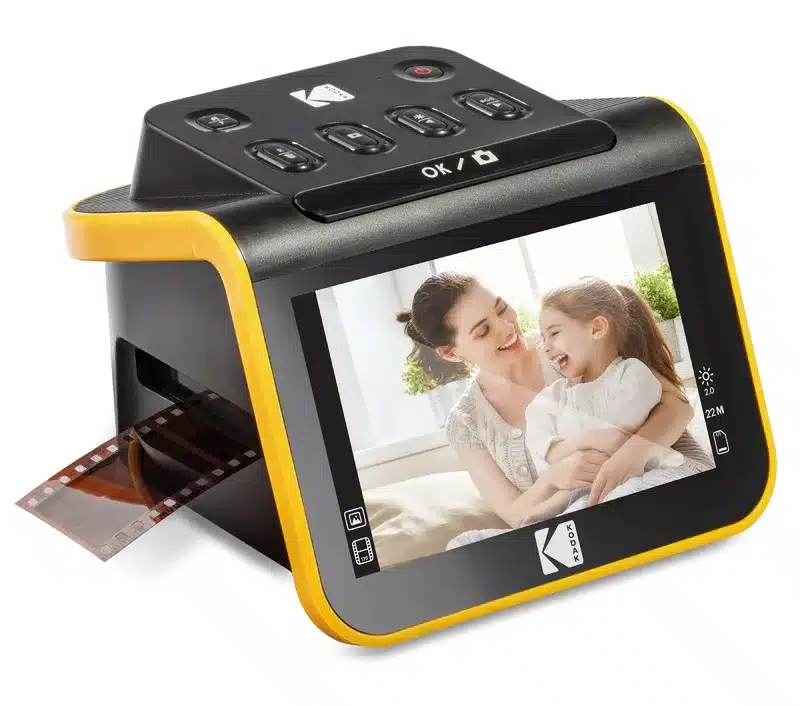
The Slide N Scan is a standalone scanner with a 5-inch screen that saves straight to an SD card, so you don’t need a computer or camera. It takes 35mm, 110 and 126 negatives and mounted 35mm slides, and it has by far the most ratings here: 4.3 stars from 12,718.
It trades quality for speed. Lon.tv found scanning “incredibly fast” but called it “not an archival-quality scanner”: the sensor is 13 MP, the 22 MP mode is interpolated and lacks fine detail, and there’s no TIFF option. It doesn’t take 120 film. Buy it for family snapshots, not your best negatives.
What about a flatbed scanner?
For both 35mm and 120 with infrared dust removal, the usual answer was the Epson Perfection V600. Epson’s website now lists it as discontinued, and on November 3 the only new unit on Amazon was $1,258 from a reseller. If you want one, look for a used or refurbished unit.
Or let a lab do it
If you shoot only a few rolls a year, a lab’s develop-and-scan service may cost less than any of this gear, and you get finished positive files back. Our guide to getting a disposable camera developed explains how lab developing and scanning work.
Already own a DigitaLIZA? How to get better scans
- Scan in a dim room. DPReview found the light panel can’t always overcome reflections from room lights.
- Flatten curled film first. Keep strips flat in sleeves before scanning, and load them emulsion side down.
- Level everything. Check the spirit level on the film holder, then put it on your camera’s screen and adjust the tripod until the camera is level, as the manual describes.
- Use a camera for prints. A camera with a macro lens on a tripod or copy stand captures far more detail than a phone.
- With a phone, back off and zoom. Raise the phone until it focuses, then zoom in, as 35mmc’s reviewer did (about 3x).
- Use the masks. The 36 x 24 mm mask covers the sprocket holes for standard frames, and the manual says the 110 frame cover gives more accurate color balance.
- Power it from USB. DPReview called the battery compartment “a bit unnecessary”; a 5V USB charger or power bank is all you need.
- Invert and clean in software. Plan on Lightroom with Negative Lab Pro or a phone app to invert, and on removing dust by hand.
Frequently asked questions
What’s the difference between the DigitaLIZA+ and DigitaLIZA Max?
The Max adds a base plate, a slider and a smartphone stand so you can scan with a phone. The film holders and light panel are the same in both.
Can you use a camera on the DigitaLIZA Max stand?
No. Lomography’s manual says not to mount digital cameras on the phone clamp. Use a tripod or copy stand instead.
Does the DigitaLIZA scan 110 and 127 film?
Yes. 127 film goes in the 120 holder with the included 127 mask. 110 film needs the 110 film mask, which the current DigitaLIZA+ listing on Amazon includes; older kits need it as an add-on.
Can the DigitaLIZA scan 6×7 or 6×9 negatives?
Not in one shot. 35mmc found the 120 holder shows a 6×6 area, so larger frames need several shots stitched in software.
Does the DigitaLIZA come with software?
No. You invert the negatives yourself with an app or desktop software, and there’s no dust removal.
Can the DigitaLIZA scan slides?
It scans film strips, negative or positive, but there’s no holder for mounted slides. For mounted slides, look at the Nikon ES-2, the Plustek OpticFilm 8200i SE or the Kodak Slide N Scan.
Is the DigitaLIZA Max on Amazon?
Not in the US as of November 3, 2026. The DigitaLIZA+ is, at $79.90; Lomography sells the Max directly.
What power does the DigitaLIZA light panel use?
Two AA batteries, or a micro-USB cable from a standard 5V charger or power bank.
Sources
- Lomography, DigitaLIZA+ and DigitaLIZA Max instruction manual (PDF)
- DPReview, Lomography DigitaLIZA+ and Max film scanner review (Mike Tomkins, September 2022)
- 35mmc, Lomography DigitaLIZA Max review (George Griffin, July 2022)
- G Style Magazine, Scanning Made Easier With Lomography’s DigitaLIZA Max (June 2022)
- Unique Photo, Comparing Negative Supply vs Lomography at Home Scanners (October 2022)
- Digital Camera World, Lomography just made scanning negatives at home easier! (March 2025)
- Fstoppers, Valoi easy35 v2 review
- Nikon, ES-2 film digitizing adapter user’s manual (PDF)
- Plustek OpticFilm 8200i SE brochure (PDF)
- Lon.tv, Kodak Slide N Scan review (February 2025)
- Epson, Perfection V600 product page
- Amazon US product listings, prices and ratings, checked November 3, 2026
As an Amazon Associate, Artistic Hive earns from qualifying purchases.