Disposable cameras capture moments with a nostalgic charm that digital photography often can’t replicate.
These analog gems hold a unique appeal, but in our digitally-driven world, the desire to share, edit, and immortalize these memories on our smartphones has become paramount.
In this comprehensive guide, we’ll dive into the art of bridging the gap between disposable camera snapshots and the convenience of digital sharing. From methods to benefits, we’ll explore it all.
Updated November 2026. The quick answer: a disposable camera shoots film, so there’s nothing to transfer until the film is developed. When you get it developed, ask for digital scans. Mail-in labs such as The Darkroom, Mpix and Old School Photo Lab email you a download link that you can open on your phone and save to your camera roll; Walgreens includes a photo CD instead. If you only have prints, photograph them with a scanning app such as Google PhotoScan, and if you have the negatives, a film scanner or a lab can scan them.
Benefits of Having Disposable Camera Pictures on Your Phone
Transferring your disposable camera pictures to your phone isn’t just about keeping up with the times; it’s about enhancing your photography experience:
- Seamless Sharing: The immediacy of sharing disposable camera pictures with friends and family is priceless. Send your shots via messaging apps or share them on social media platforms without delay.
- Unleash Your Inner Editor: With digital copies on your phone, you gain the power to edit your disposable camera pictures with tools like Lightroom Mobile. Elevate colors, refine exposure, and play with filters to give your analog photos a modern twist.
- Digital Safekeeping: Film ages and degrades over time, but digital copies remain unaffected. By transferring your disposable camera pictures to your phone, you’re safeguarding your memories against the ravages of time.
- Print with Precision: Having digital copies allows you to select your favorite shots for printing. Create personalized albums, wall decor, or mementos with ease.
Methods to Get Disposable Camera Pictures on Your Phone
Here are five effective methods to transfer the magic of disposable camera pictures to your smartphone:
Method 1 – Get Digital Scans When You Develop Your Film Roll
When you get your disposable camera developed, ask for digital scans as well as, or instead of, prints. Walgreens includes a free photo CD of scans with its $15.99 film processing, and Walmart offers digital copies too. CVS paused film processing on October 24, 2026. A CD needs a computer with a disc drive, so if you want the photos straight on your phone, a mail-in lab is easier.
This option is convenient and ensures your memories are digitized during the development process.

If you’re happy to mail the camera, labs such as The Darkroom (from $17), Mpix ($13.95 with scans, plus shipping) and Old School Photo Lab (from $25, shipping both ways included) email you a link to your scans, and The Darkroom and Old School also send your negatives back. Our guide to getting a disposable camera developed compares them.
From lab scans to your camera roll:
- Open the lab’s email or gallery link on your phone.
- Download the photos. Many labs send them as one .zip file: on an iPhone, tap it in the Files app to unzip it; on Android, open it with Files by Google or your phone’s file manager.
- Select the photos and save them to Photos on an iPhone, or to your gallery on Android.
- Got a photo CD instead? Copy the files to a computer with a disc drive, then send them to your phone with AirDrop, Google Photos, iCloud Photos or a USB cable.
Method 2 – Scan Your Prints With a Flatbed Scanner
If you already have prints, a flatbed photo scanner gives you sharp digital copies without the glare and skew of a phone photo.
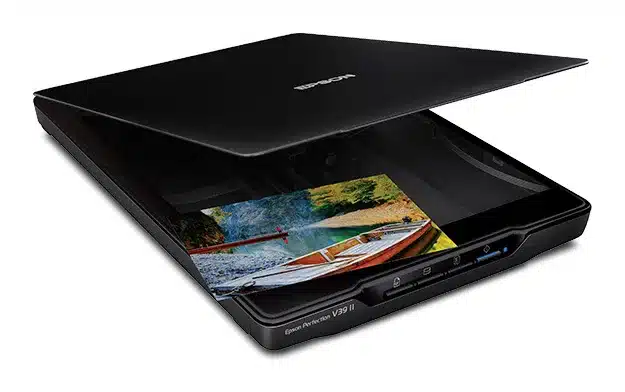
For prints, the Epson Perfection V39 II is an affordable choice at about $105 on Amazon. It scans photos at up to 4800 dpi, and Epson’s ScanSmart software can send scans to cloud storage, so they’re easy to open on your phone. It scans prints and documents, not negatives.
Method 3 – Scan the Negatives With a Film Scanner
If you have the negatives, scanning them usually gives better results than scanning prints, because a negative holds more detail than a small print.
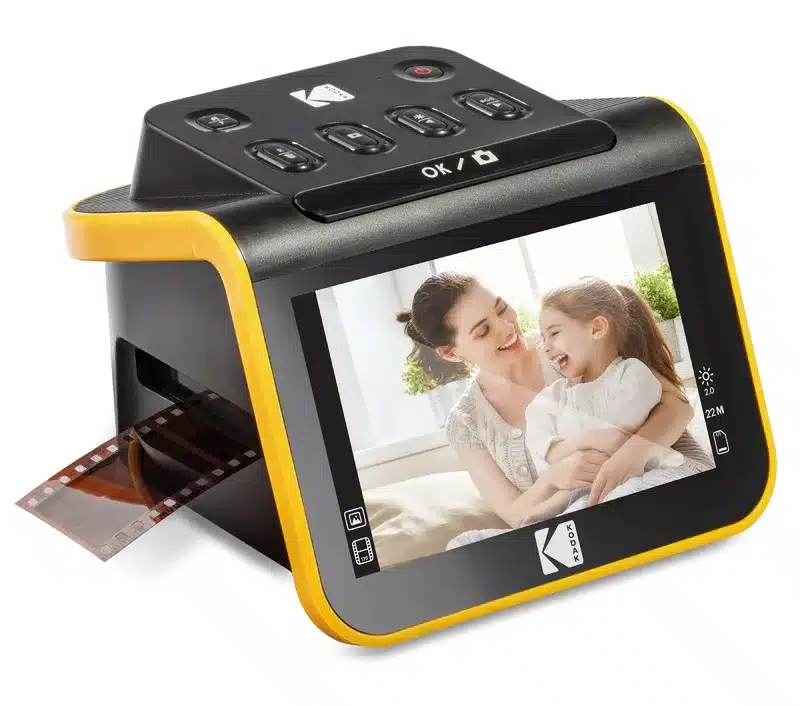
The KODAK Slide N Scan (about $190 on Amazon) is the simple way to do it: slide the negative strip in, check each image on its 5-inch screen and save it to an SD card (not included), then copy the files to your phone or computer. For a budget experiment, the KODAK Mobile Film Scanner (about $40) is a fold-out light box that uses your phone’s camera and Kodak’s app instead. Kodak itself says it’s mostly for play, so expect lower quality.
Method 4 – Use a Phone Scan App to Take a Picture of the Prints
Harness the potential of your smartphone by using dedicated scan apps.
These apps enable you to capture physical prints using your phone’s camera, though results may vary based on lighting and stability.

One of the best apps to use is called Google Photoscan and is available for both IOS and Android.
For the best results, lay the print flat in soft daylight near a window and turn the flash off. PhotoScan takes several shots of each print and combines them to remove glare.
Method 5 – Bring the Film Negative to a Photography Store and Get Them Scanned
Photography stores offer specialized scanning services for film negatives. Enlisting professionals ensures high-quality scans that capture the essence of your disposable camera shots.

I would search on Google Maps for “photography stores near me” and call to see if they offer this service, the quality of the scans they offer, and their prices.
Comparison of Methods to Get Disposable Camera Pictures on Your Phone
| Method | What you need | Cost | Quality | Best for |
|---|---|---|---|---|
| Scans when you develop | Nothing extra | Usually included in the developing price | Good to very good | Most people |
| Flatbed scanner for prints | A photo scanner | About $105 for the Epson V39 II | Good | Prints you already have |
| Film scanner for negatives | A film scanner | About $190 for the KODAK Slide N Scan | Good to very good | Negatives you already have |
| Phone scanning app | Your phone | Free | Fair to good | A quick share from prints |
| Store or lab scan of negatives | Your negatives | Varies by lab | Very good | The best copies of old negatives |
Conclusion
For most people, the easiest way is to ask for scans when you develop the camera, then download them on your phone. If you already have prints, a scanning app is the quick fix and a flatbed scanner the better one; if you have the negatives, a film scanner or a lab scan gets the most out of them.
Haven’t developed it yet? See how to get a disposable camera developed. Shopping for your next one? See our best disposable cameras guide, or our best point-and-shoot film cameras if you’d rather reload one camera.
FAQs: Disposable Cameras
Get the film developed and ask for digital scans. Mail-in labs email a download link you can open on your phone and save to your camera roll. If you only have prints, use a scanning app such as Google PhotoScan; if you have the negatives, use a film scanner or ask a lab to scan them.
The same way as any disposable: the brand doesn’t matter. Fujifilm QuickSnap film is standard 35mm color film, so any lab that develops color film can process it and send you scans.
The same way as any disposable: have the camera developed with digital scans, then download them on your phone. Kodak FunSaver film is standard 35mm color film that any color lab can process.
The pictures on the CD are already digital files. Copy them to a computer with a disc drive, then send them to your phone with AirDrop, Google Photos, iCloud Photos, email or a USB cable.
CVS paused film processing on October 24, 2026, so for now take the camera to Walgreens or Walmart, or mail it to a lab that emails you a download link. If you have older CVS scans on a CD, copy them to a computer and send them to your phone.
No. A disposable camera has no memory card, Bluetooth or cable port. The photos are on film until a lab develops and scans it.
Yes. Ask the lab for scans only. Mpix and The Darkroom both sell developing with scans, with prints as an option.
As an Amazon Associate, Artistic Hive earns from qualifying purchases.