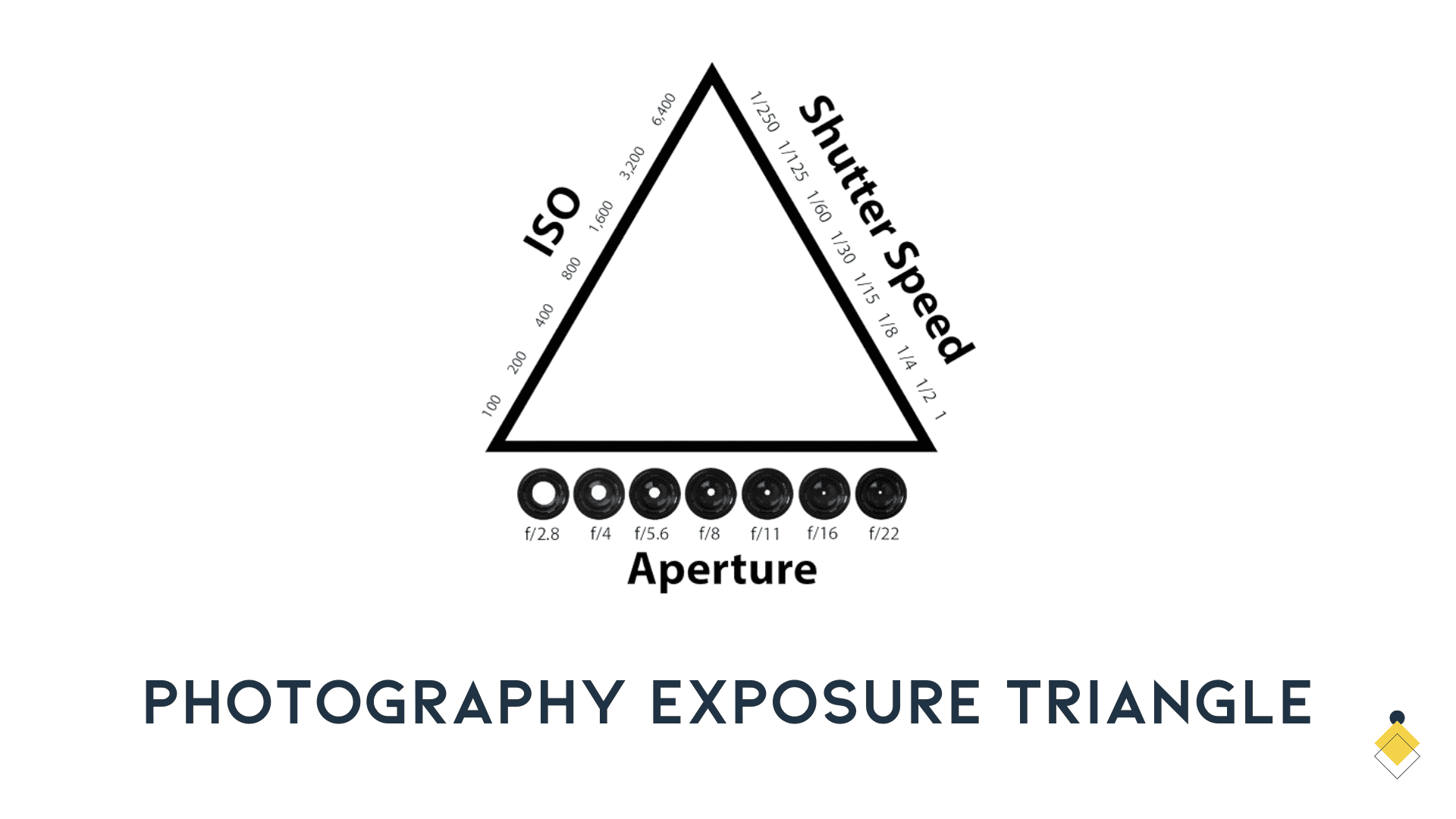
Aperture and shutter time control how much light the camera captures. ISO influences how that signal is recorded and rendered. The exposure triangle helps you balance those controls, but they are not three interchangeable ways of collecting light.
Aperture: choose the depth you need
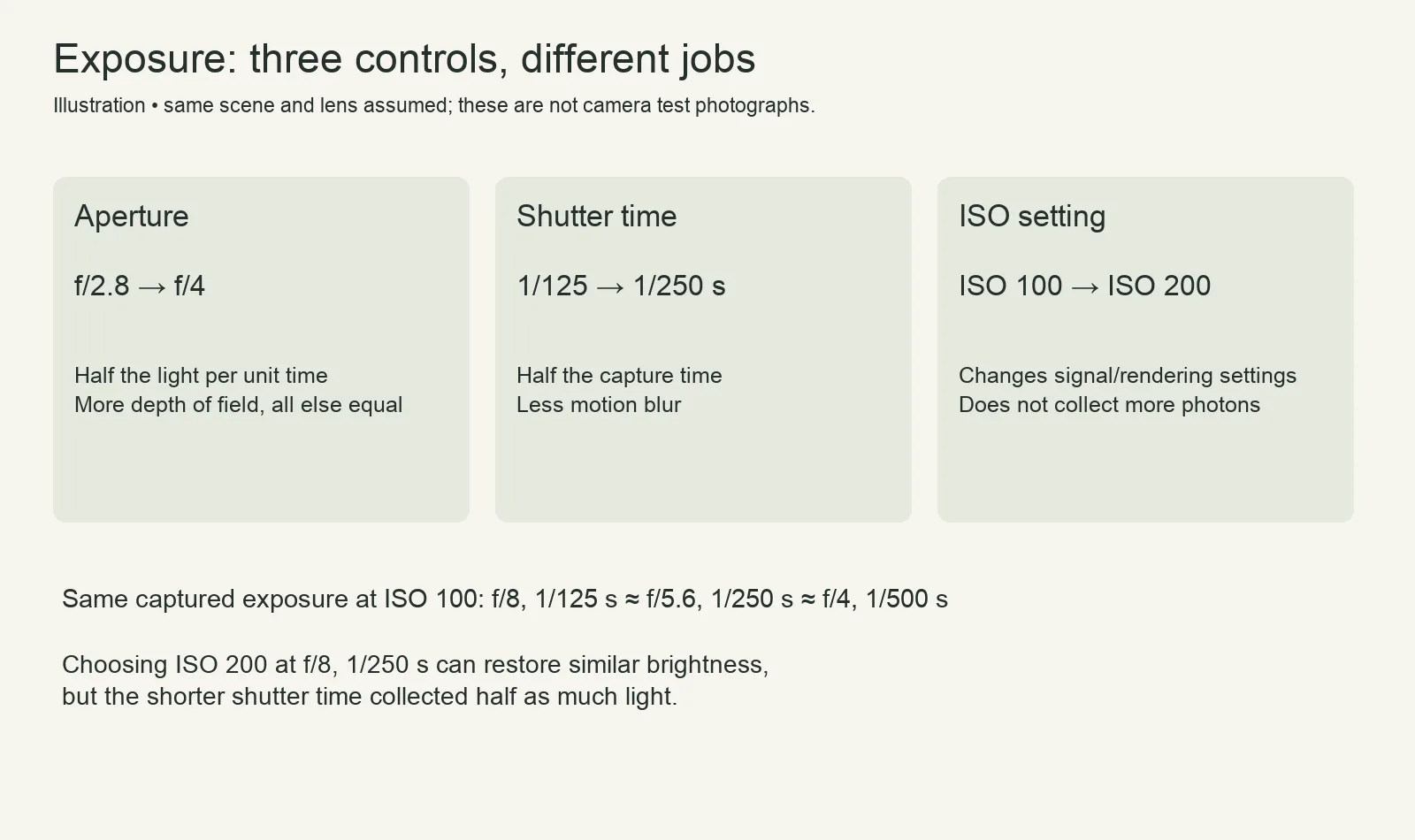
The f-number relates focal length to the entrance-pupil diameter. A smaller number, such as f/2.8, means a wider opening than f/4. Opening one full stop approximately doubles the light reaching each unit of sensor area during the same shutter time. Lens transmission can make real exposures differ slightly.
For a portrait with the background softened, start with a wider aperture, then check whether both eyes and the important parts of the face are acceptably sharp. For a near-to-far landscape, a smaller aperture can increase depth of field. Focus distance, focal length, sensor format and viewing size also matter; f/16 is not automatically the sharpest choice because diffraction can reduce fine detail.
Shutter time: decide how movement should look
At 1/500 second the sensor collects light for one quarter as long as at 1/125. That is two stops less exposure if the aperture is unchanged. A shorter time can reduce subject and camera blur. A longer time can deliberately show flowing water or moving lights.
Start an action exercise around 1/500 second, inspect the result and shorten the time if the subject still blurs. There is no universal action speed: a close bird crossing the frame and a distant walking person move differently in the image. For deliberate motion, read the light-trail photography guide.
ISO: similar brightness does not mean equal captured light
Increasing ISO does not send more photons through the lens. Depending on the camera, it changes amplification and/or processing and the exposure recommended by automatic metering. Raising ISO while keeping aperture and shutter fixed can make a brighter rendering, with camera-dependent effects on noise and highlight headroom.
If you double ISO and halve shutter time, the displayed brightness may remain similar, but you captured half as much light. That reduction often makes noise more noticeable. Avoid the opposite mistake too: forcing the lowest ISO while severely underexposing a moving subject is not a universal route to a cleaner image.
Work through equivalent settings
| Aperture | Shutter time | ISO | Tradeoff |
|---|---|---|---|
| f/8 | 1/125 s | 100 | Reference exposure |
| f/5.6 | 1/250 s | 100 | About one stop wider and one stop faster |
| f/4 | 1/500 s | 100 | About two stops wider and two stops faster |
| f/8 | 1/250 s | 200 | Similar rendering may be possible; half the captured light |
Standard marked f-numbers are rounded. These examples assume unchanged scene illumination and lens transmission.
- Start at f/8, 1/125 second, ISO 100. To use f/4 while preserving captured exposure, choose approximately 1/500 second.
- Start at f/5.6, 1/250 second, ISO 400. At f/8, use approximately 1/125 second for the same captured exposure.
- Lock aperture and shutter, then compare two ISO settings. Inspect highlights and shadows instead of treating equal screen brightness as proof of equal image quality.
A stop chart you can use without a calculator
A stop is a doubling or halving. Moving one column to the right in this table reduces captured light by one stop for aperture or shutter time. The ISO row instead shows a one-stop increase in the ISO setting; it does not increase the light entering the camera.
| Control | Successive full-stop settings | |||||
|---|---|---|---|---|---|---|
| Aperture | f/2.8 | f/4 | f/5.6 | f/8 | f/11 | f/16 |
| Shutter time | 1/30 s | 1/60 s | 1/125 s | 1/250 s | 1/500 s | 1/1000 s |
| ISO | 100 | 200 | 400 | 800 | 1600 | 3200 |
The familiar shutter labels are rounded. Many cameras also offer half- or third-stop increments, so three clicks may represent one full stop rather than three stops. Check your camera’s increment setting before counting clicks.
Choose a camera mode for the decision that matters
Aperture priority, often A or Av, lets you choose aperture while the camera chooses shutter time. Use it when depth of field is your priority, but keep checking the shutter. Shutter priority, often S or Tv, puts you in charge of shutter time while the camera selects aperture. If the lens cannot open far enough, the chosen shutter can still produce a dark frame. Sony’s explanation of the two modes describes that division of control.
Manual with a fixed ISO holds all three settings until you change them. That is useful for a repeatable series under steady light. Manual with Auto ISO is different: you fix aperture and shutter while the camera can alter ISO. Its limits and exposure-compensation behavior depend on the camera. In priority modes, an Auto ISO minimum-shutter preference is not necessarily an absolute floor once the ISO ceiling is reached; consult the exact manual.
Three decisions in changing light
A person starts moving
Suppose a stationary portrait works at f/4, 1/125 second and ISO 400. Changing to 1/500 second loses two stops of captured light. If you keep f/4, ISO 1600 may restore similar displayed brightness, but inspect noise and highlights. Opening to f/2 can instead compensate with light, if the lens supports it and the reduced depth of field still suits the picture. These are calculated alternatives, not a promise that either setting freezes every movement.
A landscape needs more depth
At f/5.6, 1/250 second and ISO 100, moving to f/11 costs about two stops. Around 1/60 second compensates at the same ISO. That may be workable on suitable support for a still scene; leaves, people and water can move during the longer exposure. Decide whether motion or depth matters more before making the change.
The subject is darker than a bright background
Increasing exposure brightens both. If the sky is already clipping, another triangle adjustment cannot make the scene’s brightness range disappear. Move the person into better light, change the framing, add appropriate light or accept a silhouette. Separate exposures can suit a static scene, but moving subjects complicate blending.
Use the meter and histogram as evidence
The meter proposes an exposure; it does not know which surface should look white, gray or black. In an automatic mode, exposure compensation asks for a brighter or darker result. In fully manual exposure with fixed ISO, you must change an actual exposure setting. Auto ISO changes that relationship on supported cameras.
Review important subject detail and the individual color channels where available. A dark scene does not need a histogram centered in the middle, and a bright scene need not be forced dark to avoid every highlight warning. Camera histograms and warnings generally describe a processed preview, so they are guides rather than exact measurements of every RAW value. Make a short bracket when the result is uncertain and the subject permits it.
A reliable order of decisions
Choose aperture for depth or shutter for motion, depending on what could ruin the picture. Set the other control within the available light, then choose a workable ISO. Check important highlights and the subject, not just the average meter reading. A white wall and a dark jacket can bias reflected-light metering in different directions.
Use Sunny 16 for a daylight estimate and sunset photography for rapidly changing light. Compare sensor formats when you need to understand equivalent framing rather than assuming the same f-number gives the same depth on every system.
If an image looks hazy even when focus and exposure are correct, inspect the front element before adding contrast. The lens-cleaning guide covers cleaning equipment and handling considerations.