By Matteo Martignago, cinematographer and founder of Artistic Hive ·
You can download three free script supervisor templates below: a daily log, a continuity log sheet, and a script breakdown sheet, all as printable PDFs. A good script supervisor template keeps a shoot consistent from take to take, and each provides fields you can adapt to your production. Below the downloads, here’s what every form tracks, when to reach for it, and how it keeps a shoot from falling apart in the edit.
Free Script Supervisor Templates to Download (PDF)
| Template | What it tracks | When you use it |
|---|---|---|
| Daily Log | Scene/setup, take, selection, file references, duration and notes | Rolling, all day, on every take |
| Continuity Log | Wardrobe, props, hand positions, eyelines, set dressing, shot to shot | Whenever a detail could change between takes or scenes |
| Script Breakdown | Cast, props, costumes, makeup, and effects each scene needs | In prep, before the scene shoots |
Each direct PDF download contains two US Letter landscape pages: a blank form followed by a clearly fictional completed example. Print page 1 for a blank working copy. These revised files replace the older Google Drive downloads linked from this article; the original files have not been overwritten. You may adapt these original teaching forms for your own production.
What Is a Script Supervisor Template?
A script supervisor template is a structured form for recording continuity on a film set: the running record of what was shot, how, and what state every prop, costume, and performer was in. It keeps a production consistent from take to take and scene to scene, so a coffee cup that was half full in one shot doesn’t come back full in the next. The script supervisor fills it in live during the day, then hands it to the editor, who relies on it to cut the film together without continuity errors slipping through.
A continuity record helps the editor compare takes and understand mismatches. A watch changing wrists or a glass refilling between angles should be recorded clearly. Notes can help the editor choose coverage, but they cannot guarantee that every continuity problem will be repairable.
The Three Forms, and How a Set Uses Them
Script Supervisor Daily Log Template
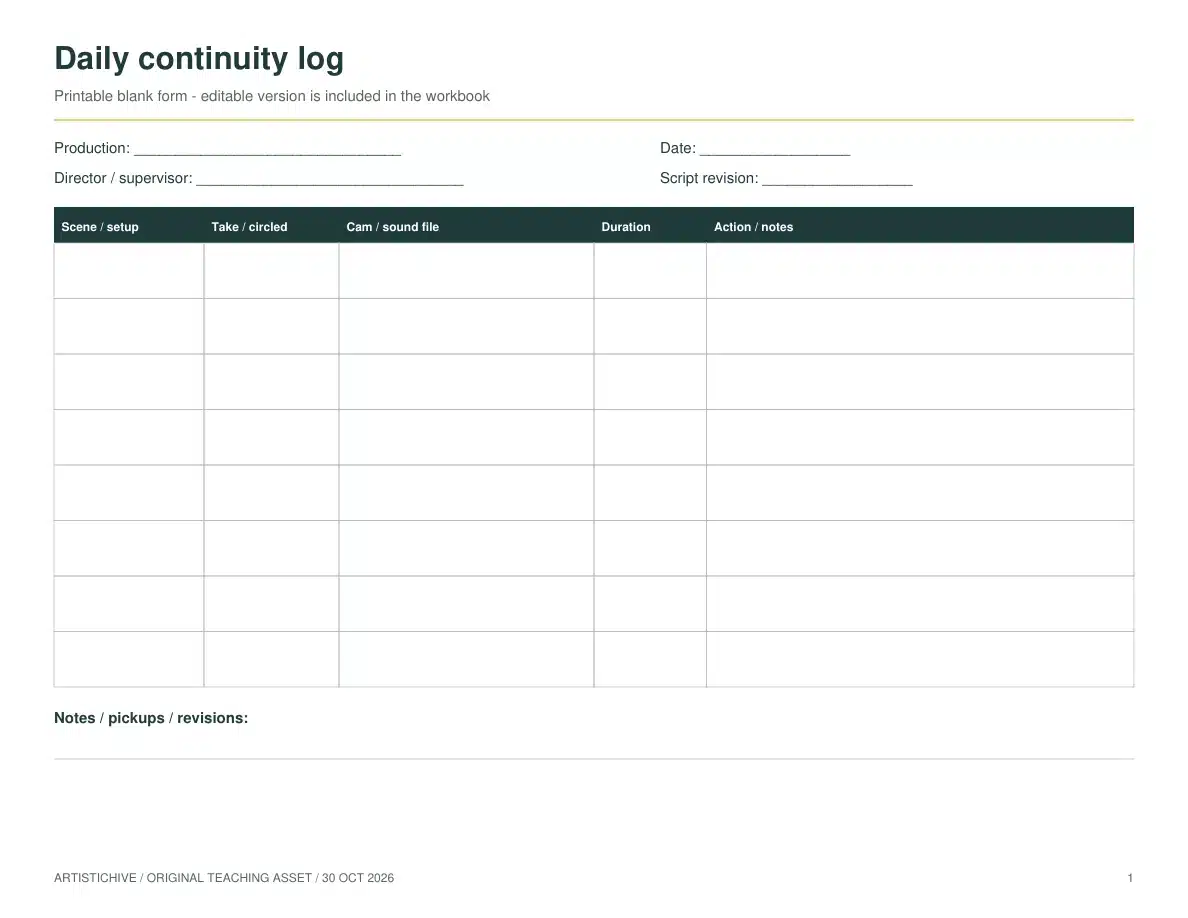
This daily log is a take-level record with scene/setup, take and selection, camera/sound file references, duration and action notes. It does not calculate daily page counts or setup totals and is not a complete production-office progress report. Agree any additional reporting fields and handoff requirements with the production and editorial teams.
Continuity Log Sheet Template
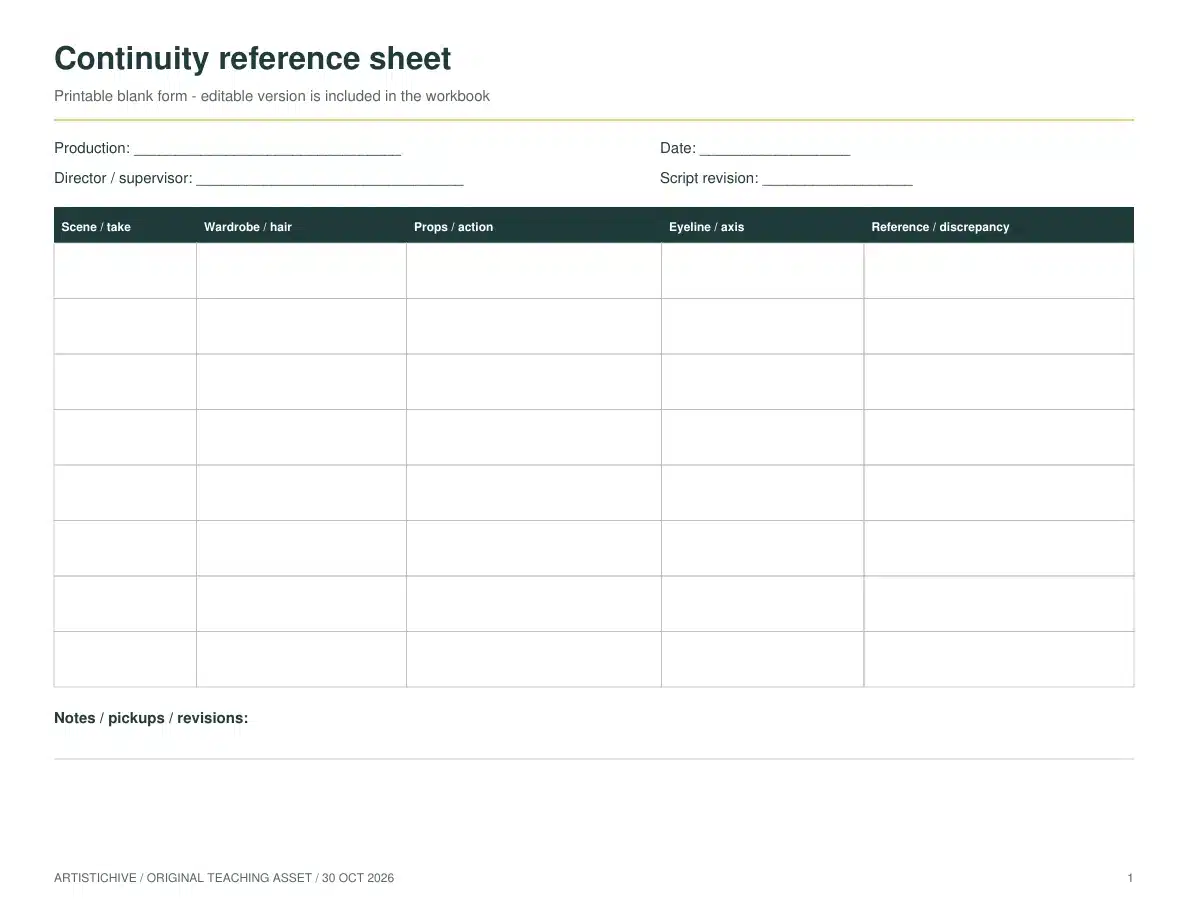
This continuity reference sheet records scene/take, wardrobe and hair, props and action, eyeline/axis, reference IDs and discrepancies. Record the state you actually observed and identify any intended change. If you cite a reference photograph, use a real file ID and keep the image with the production records; the fictional example does not supply real reference photographs.
Script Breakdown Template
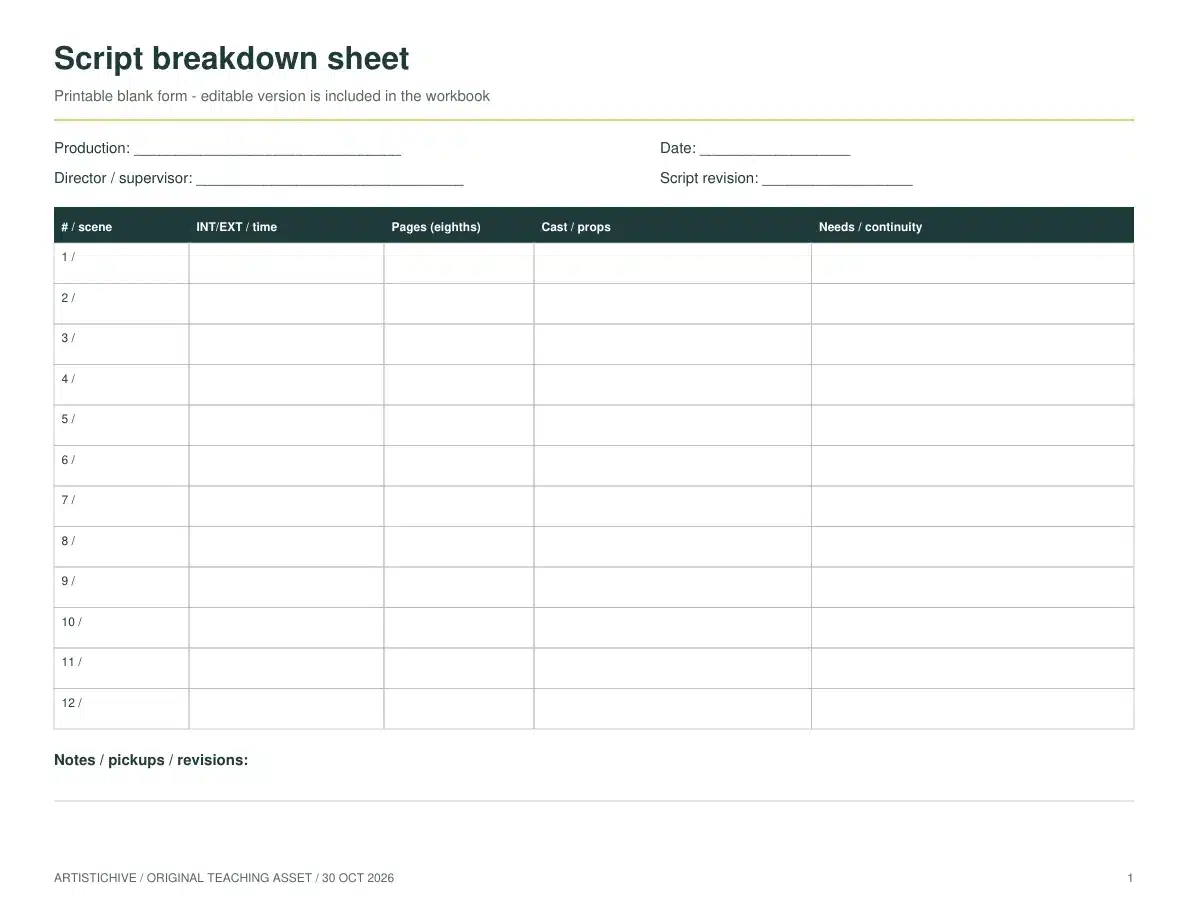
Use the breakdown during preparation to list scene number, interior/exterior and time of day, script length in eighths, cast/props and other needs or continuity notes. Rows are numbered 1–12. This compact teaching form does not replace a department-specific breakdown, risk assessment or full production schedule. Add separate fields where your project needs them.
Digital vs. Paper Forms: Which Should You Use?
Both still earn their place on set. Digital forms win on speed and sharing; paper wins on reliability and simplicity. Here’s how they compare.
| Digital forms | Paper forms | |
|---|---|---|
| Best for | Larger productions, remote crew, fast turnarounds | Small shoots, tough conditions, no-tech backup |
| Strengths | Real-time sharing, searchable notes, fewer counting errors, quick export to the editor | No battery or software to fail, instant visual overview, familiar and fast |
| Trade-offs | Depends on devices, apps, and charge | Slower to share, harder to search later |
If you go digital, a few apps are built for exactly this work on an iPad: Scriptation for marking up and sharing scripts, Shot Lister for scene scheduling and progress, and MovieSlate for digital slating and shot logging in one place. Many supervisors also run ScriptE to auto-calculate timings and counts.
Keep an offline copy and inspect a print preview before the shoot. The revised PDFs have 0.5-inch side margins and two pages each; select US Letter landscape and print only the blank page if you do not need the example. Digital page-layout checks passed, but no physical printer test or working script-supervisor sign-off has been recorded.
Completed continuity example
Download the blank continuity form and fictional completed example (PDF, 2 pages). This teaching example uses the fictional short film The Last Light.
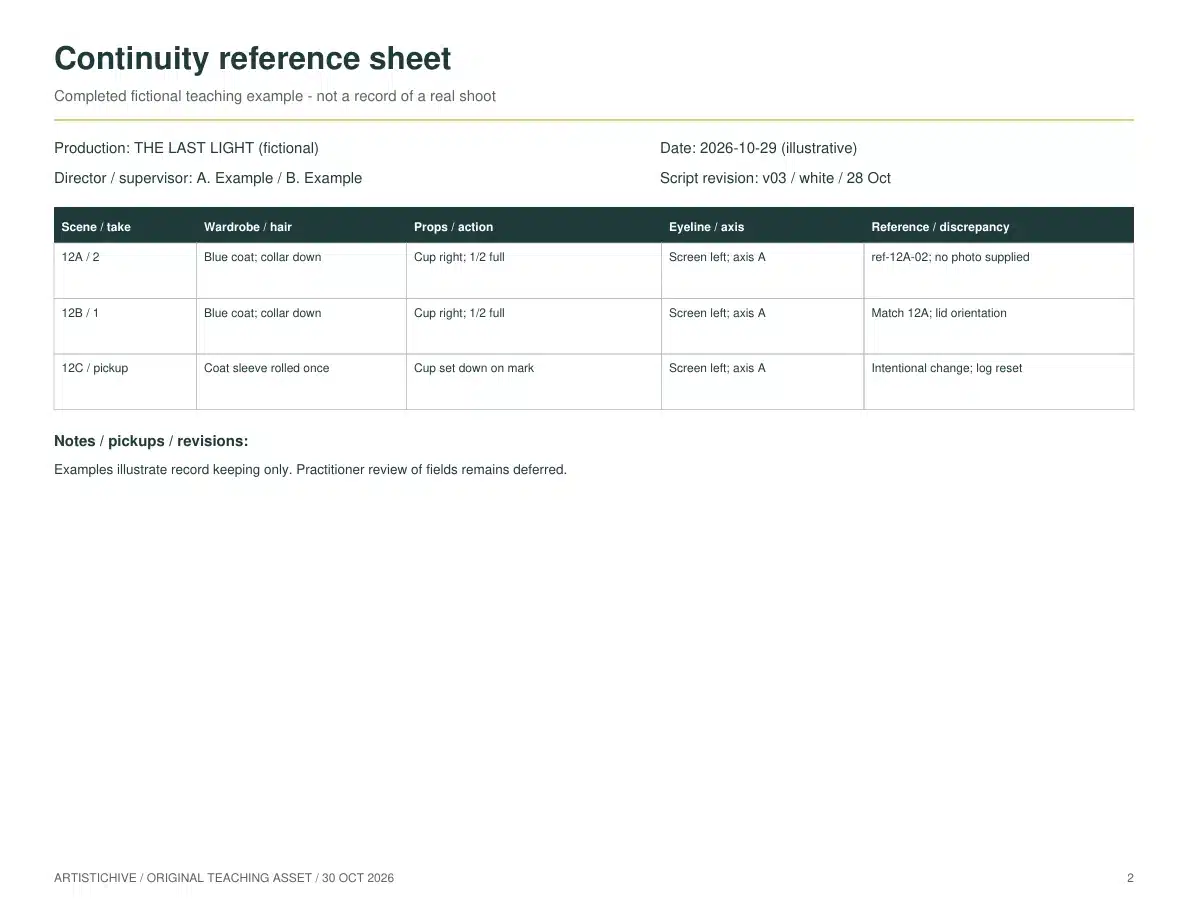
Read a continuity note in three parts: identify the scene, slate and take; state what action or detail changed; explain what editorial needs to compare. Keep screen direction separate from an actor’s left or right hand. Record a discrepancy rather than silently rewriting the earlier take’s notes.
Continuity notes versus the daily report
The continuity record describes what must match between shots. A daily progress report summarizes the day’s coverage, timings and progress. A take log supports those records, but does not replace every production-office field. Agree on the handoff format with editorial and production before shooting.
For the end of the production workflow, use the editable movie-credit resources; for the wider plan, see how to make a movie.
Set up the forms before the first take
Start with the dated shooting script the team has agreed to use. Put the project title, shoot date, script revision and your name on the working records. If the supplied form has no dedicated box for a field, add it in the notes area or on a cover sheet. A scene number without a script version becomes ambiguous when pages change.
Separate the shooting day from the story day. A scene filmed on Friday can belong to the same fictional morning as a scene filmed on Monday. On the breakdown, note the state required at the beginning and end of each scene: lamp working or broken, jacket on or off, box empty or packed. This is what lets departments reset correctly when production shoots out of story order. ScreenSkills describes continuity preparation across actions, cast, wardrobe, props and story days.
Agree the labels that connect the records
Ask camera, sound and editorial which identifiers they will actually use. A slate label, a camera clip filename and a sound file reference are different fields, even when they describe the same take. Copy recorded identifiers exactly; do not invent an expected filename before it has been confirmed. On a multicamera shoot, distinguish the A- and B-camera records rather than assuming one row identifies both files.
Also agree what a selection mark means and who made it. A director’s preferred take is useful information, but it does not certify clean sound, perfect focus or matching action. Record the preference and any limitation separately. If using abbreviations such as NG for no good or PU for pickup, put a small legend with the notes. The editor should not have to decode a new shorthand at midnight.
Write notes an editor can act on
A useful note identifies an observable event and its position in the action. “Continuity problem” gives no route to a solution. In a new fictional example, “Scene 12, setup B, take 3: right hand lifts cup before ‘I should go’; wide take 2 lifts after the line” tells editorial exactly what to compare.
| Observation | Where to record it | Why it matters |
|---|---|---|
| The director prefers take 3, but a door slams during its last line. | Daily log selection and action/technical notes. | The preference and the sound problem remain visible together. |
| The cup starts half full in the master and almost empty in the close-up. | Continuity sheet, linked to both takes. | The editor can compare the relevant action rather than search every clip. |
| Only the final sentence is repeated after a reset. | Daily log with the exact pickup start and end. | Editorial knows the clip is partial coverage. |
| A reference photo records the costume after the coat is removed. | Continuity sheet with a real photo ID and scene state. | The photograph cannot be mistaken for the scene’s opening condition. |
Do not discard every take marked unusable overall. A take interrupted by a noise may still contain a usable reaction or opening phrase. Note the affected portion. When an intentional performance change creates a new continuity version, record that choice instead of overwriting the earlier description.
What the downloads do not replace
A lined script shows which script material a setup covers; a facing page can carry detailed setup and take notes. Those records answer different questions from a compact continuity sheet. These downloads do not supply a lined script or a full facing-page system. Keep those additional records when the production or editor needs them.
At wrap, reconcile the take list with camera and sound references, identify missing or uncertain information, and send the agreed reports together with the relevant script revision and reference images. Keep the original working record and date later corrections. A revised note should remain traceable to what changed.
When using the production workbook, duplicate the file before clearing example entries. Keep one consistent identifier across the Daily Log, Continuity and Breakdown sheets, then check the exported or printed copy for clipped notes. A spreadsheet can organize the handoff; it cannot decide whether coverage matches or whether a scene is complete.
What Makes a Template Work on Set
Use short, consistent labels and enough space for notes. Confirm scene numbering, camera IDs, file naming and handoff requirements with your team. Keep an offline backup and check legibility before the shoot.
Which Template Should You Start With?
Use the breakdown in preparation, the daily log for takes and file references, and the continuity sheet whenever details must match. Review the fields with the person responsible for script supervision and editorial before a real shoot. Clear fictional example data from your working copy and keep the original download as a reference.
Script Supervisor Template FAQ
Are these script supervisor templates free?
Yes. The three revised PDFs and the editable workbook are free to download and adapt for your own production. Each PDF contains a blank form and a fictional completed example, with no Google sign-in required.
What format are the templates in?
The three PDFs use US Letter landscape pages. Each contains one blank form and one fictional example. Choose page 1 to print a blank sheet, and confirm scale, margins and legibility in your own printer preview.
Is there an editable Google Sheets or Excel version?
The editable production workbook (XLSX) contains six sheets: daily log, continuity, breakdown, schedule, credits and shot list. Download a copy before editing, clear fictional entries, and preserve formula cells. Formula recalculation and sheet copying were checked in Apple Numbers; all six sheets fit one landscape page in its print preview. Excel and Google Sheets have not been independently verified. This download is an XLSX file, not a hosted Google Sheets template.
What does a script supervisor track?
Continuity, above all. That means what was shot in each take, the timings and counts for the day, and every physical detail that has to match across shots, from wardrobe and props to hand positions, eyelines, and set dressing. It all goes into a report the director and editor use in post.
What’s in a script supervisor report?
A day’s report pulls together the daily log and continuity notes: scenes and takes shot, timings, page and setup counts, any discrepancies spotted, and where the day landed against the schedule. It’s the document the editor leans on to assemble the cut cleanly.
Do script supervisors use a stopwatch?
Many do. Timing each take tells the production how long scenes run and helps flag pacing issues early, which matters on anything that needs precise comedic or dramatic timing. Check the timing features in your chosen app; a separate stopwatch can also be used.