By Matteo Martignago, cinematographer and colorist. First published 2024, rewritten from scratch and last updated 26 July 2026.
What this is, and what it is not
I have not shot on an ALEXA 35. This is a documentation and workflow review, not a hands-on test. Specifications come from ARRI’s own published documents, measured image figures come from named third-party lab tests and are attributed to them, and every price is a dated listing from ARRI or a named rental house, or trade reporting that I attribute and link to the outlet that published it. Where I give an opinion, it is my read from the grading side of this work, and it is marked as one.
The ARRI ALEXA 35 is a 4.6K Super 35 cinema camera built around the ALEV 4 sensor, which ARRI rates at 17 stops of dynamic range (exposure latitude). That sensor carries 4608 by 3164 photosites across an active area of 27.99 by 19.22 mm. One thing to know before anything else: since August 2025 ARRI has listed it under legacy cameras and states it is replaced by the ALEXA 35 Xtreme.
The short version
The picture is identical on the ALEXA 35, on the Xtreme and on an upgraded body. What differs is frame rate, ARRICORE and price, which is why this ALEXA 35 review spends most of its length on licenses, storage and LogC4 rather than on image quality. Jump to the buy, rent or upgrade verdict.
Jump to
Verdict: buy, rent or upgrade · Specs and sensor size · Is it discontinued? · Dynamic range · LogC4 in post · ARRI Textures · Data rates and drives · Price and rental · ALEXA 35 vs Xtreme · Versus other cameras · Where it falls short · FAQ
What changed since this camera launched
- August 2025: the ALEXA 35 Xtreme shipped, and ARRI moved the ALEXA 35 to its legacy range.
- January 2025: a lower-priced Base license tier arrived, so identical hardware now ships with different capabilities enabled.
- October 2025: CineD reported an 18,500 dollar drop in the B&H price of the ALEXA 35 Premium Production Set, with no ARRI statement behind it.
- 7 July 2026: current firmware is SUP 6.1.0, one package covering all four bodies in the family.
The ALEXA 35 in 2026: a legacy body with a current sensor
Is the ALEXA 35 discontinued?
Not discontinued, but no longer current. ARRI’s own product page for the camera now sits under legacy cine cameras and opens by saying that “the ALEXA 35, now replaced by the ALEXA 35 Xtreme, comes as either a fully featured Premium model or a lower-priced Base model”. Bodies are still obtainable through dealers as special-order stock rather than as a current line, they are still supported by current firmware, and they remain on Netflix’s approved camera list. If you are hiring one next week, nothing about your day changes. If you are buying one, the calculus in the Xtreme section is the whole question.
What ARRI still ships and supports
Firmware is the clearest signal that the camera is not abandoned. The current release, SUP 6.1.0, was published on 7 July 2026 as a single package covering the ALEXA 35, the ALEXA 35 Xtreme, the ALEXA 35 Live and the ALEXA 35 Live Xtreme. Some features in it are limited to the Xtreme bodies, but the original camera is still inside the same maintained software family, which is more than most legacy-flagged products get.
One piece of housekeeping for anyone repeating older descriptions of the company: ARRI announced on 14 April 2026 that it had been acquired by Thomas Riedel, founder and owner of the Riedel Group, in a personal capacity, and on 13 July 2026 that its global rental business would be sold to its own management in a buy-out backed by H2 Equity Partners and continue independently. The long-standing description of ARRI as an independent family-owned manufacturer is out of date.
ARRI ALEXA 35 specs, in full
ARRI’s published figures. The Xtreme uses the same sensor, so the third column flags only what differs.
| Specification | ALEXA 35 | ALEXA 35 Xtreme |
|---|---|---|
| Sensor | ARRI ALEV 4 CMOS, Bayer pattern | identical |
| Format | Super 35 | identical |
| Photosites | 4608 x 3164 | identical |
| Active image area | 27.99 x 19.22 mm | identical |
| Photosite pitch | 6.075 microns | identical |
| Dynamic range (ARRI) | 17 stops of exposure latitude | 17 stops to 330 fps, 11 stops at 660 fps |
| Sensitivity | EI 160 to EI 6400, 1/3 stops | identical, base EI 1600 in Sensor Overdrive |
| Base sensitivity | EI 800 | identical |
| Frame rates | 0.75 to 120 fps | up to 330 fps, 660 fps in Sensor Overdrive |
| Max resolution | 4.6K 3:2 open gate, 4608 x 3164 | identical |
| Recording formats | 20 across ARRIRAW and Apple ProRes | plus ARRICORE formats |
| Codecs | ARRIRAW (13-bit, MXF), ProRes 4444 XQ / 4444 / 422 HQ / 422 | adds ARRICORE |
| Internal ND | motorised FSND: clear, 0.6, 1.2, 1.8 | identical |
| Lens mounts | LPL (LBUS), PL (LBUS), PL (Hirose), EF (LBUS), PL-to-LPL adapter, Leitz M | identical |
| Media | Codex Compact Drive 1TB and 2TB, Compact Drive Express 1TB (ProRes only) | identical |
| Pre-record | up to 20 seconds, license required | up to five minutes |
| Power | B-mount, 24 V | identical, about 10 percent lower draw |
| Current firmware | SUP 6.1.0, 7 July 2026 | SUP 6.1.0, 7 July 2026 |
What is the ARRI ALEXA 35 sensor size?
The ARRI ALEXA 35 sensor size is 27.99 by 19.22 mm, a Super 35 ALEV 4 CMOS with a 33.96 mm diagonal, 4608 by 3164 photosites and a 6.075 micron pitch. That is the active image area in 4.6K 3:2 open gate; in the 4K 16:9 mode it is about 24.9 by 14.0 mm from 4096 by 2304 photosites.
Three wrong figures circulate widely. 28.25 by 18.17 mm is the older ALEV 3 Super 35 open gate, from the ALEXA Mini generation. 24.89 by 18.66 mm is the Super 35 full aperture, the silent-film frame, and a film gate dimension rather than this sensor. 4448 by 3096 is the ALEXA LF and Mini LF photosite count. If a spec page gives you any of those for an ALEXA 35, it has been copied from the wrong row.
Is the ALEXA 35 full frame or Super 35?
Super 35. The sensor is deliberately the classic Super 35 size rather than large format, which is the entire point of the camera’s place in ARRI’s range: the ALEXA Mini LF and ALEXA LF are the large-format bodies, and the ALEXA 265 is the 65 mm one. Choosing Super 35 is usually a decision about lenses and depth of field rather than about resolution, which is covered in the comparison section.
Recording formats and frame rates
ARRI counts 20 recording formats across ARRIRAW and Apple ProRes, spanning 4.6K 3:2 open gate, 4.6K 16:9, 4K 16:9, 4K 2:1, UHD, 2K 16:9 Super 16, and the anamorphic 3.3K 6:5, 3K 1:1 and 2.7K 8:9 modes. The frame-rate range on this body is 0.75 to 120 fps, and ARRI’s own wording is that it can “record native 4K at up to 120 fps”. Open gate is where the ceiling bites, and not in the direction people assume: ARRIRAW 4.6K 3:2 reaches 75 fps on a 2TB Compact Drive but only 35 fps on a 1TB one, and ProRes at that same format stops at 60 fps. The 120 fps headline belongs to 4K 16:9 and smaller, where both codecs reach it. So a 120 fps day and an open-gate day are not the same day whichever codec you pick, and the drive size is part of the spec.
Two format facts decide jobs. First, 120 fps requires the High Speed license, which is a separate purchase. Second, Netflix’s approved camera list approves the ALEXA 35 for ARRIRAW, ProRes 4444 XQ and ProRes 4444. ProRes 422 HQ is not on that list. If your show has a Netflix delivery, the cheap-and-cheerful ProRes flavour is not available to you, and that changes your storage budget before you shoot a frame.
Dynamic range: 17 stops specified, 15.1 to 16.3 measured
Search this camera and you will be told 17 stops, 16.3 stops, 15.1 stops, and on spec pages that set it against the previous generation, 14 stops or so. Those numbers answer different questions.
Why those numbers do not contradict each other
ARRI’s phrase, used consistently in its own material, is “17 stops of dynamic range (exposure latitude)”. That is a specification about usable stops either side of middle gray, and ARRI states in its own technical notes that this is 2.5 stops beyond its previous generation of cameras.
CineD’s lab test, run by Gunther Machu on ARRIRAW at EI 800 with IMATEST, measured 15.1 stops at a signal-to-noise ratio of 2 and 16.3 stops at a ratio of 1. Those are threshold measurements: how many stops sit above a chosen noise floor. Lower the threshold and the number rises, which is why one test yields two figures. Their latitude test separately recovered roughly four stops over and four stops under base exposure. All of these can be true at once. The 14-stop figure is the odd one out only because it belongs to the previous ALEV 3 sensor and not to this one.
My read: from the grading side, the number that changes a session is not the headline at all, it is CineD’s latitude result. Roughly four stops of recoverable error either way is the difference between an underexposed night interior coming back as an image and coming back as a noise-management job. And the stop count is rarely the first limit you meet in a grade on this camera. The Texture and the Enhanced Sensitivity setting are chosen before the file exists, neither is reversible, and either one can cost you more in a lift than a stop of latitude would.
Sensitivity: EI 160 to 6400, with one base
The range is EI 160 to EI 6400 in third-stop increments, with a single base sensitivity of EI 800. This camera does not have dual native ISO, and any page that gives you “native 800 and 3200” has confused it with something else. An optional Enhanced Sensitivity mode applies from EI 2560 to EI 6400 and bakes noise reduction into the recording, including into ARRIRAW, so it is a decision with post consequences rather than a monitoring preference. ARRI recommends switching it off for green-screen work.
Rolling shutter, and which mode to pick because of it
CineD measured rolling shutter at 7.9 ms in 4.6K 3:2 open gate, 5.7 ms in the 4.6K 16:9 window, and 7.6 ms in 4K 16:9. What that means when you pick a mode:
- Whip pans, fast handheld and anything with hard vertical lines skew least in the 4.6K 16:9 window at 5.7 ms.
- Practical LEDs, police strobes, camera flashes and screens are where a slower readout shows as banding or a partial-frame flash, so the 16:9 window helps there too.
- Open gate at 7.9 ms is the mode you accept the readout penalty for when you need the full negative for reframing, stabilization or VFX.
The whole spread is 2.2 ms. Take the 16:9 window when the shot allows it, and do not rebuild a schedule around it. CineD measured these in 2022 on firmware 1.00.03, so treat them as figures for this sensor generation rather than a reading on the specific body you are hiring.
REVEAL Color Science, without the marketing
REVEAL is not a look and not a mode. It is the name for the four processing stages between the sensor and the file, and the reason ALEXA 35 footage needs a different post setup from every ARRI camera before it.
The four stages: ADA-7, ACE4, AWG4 and LogC4
- ADA-7, the ARRI Debayer Algorithm, turns the Bayer sensor read into camera-native RGB. ARRI designed this generation partly for cleaner edges, which is a compositing benefit rather than a sharpness one.
- ACE4, the ARRI Color Engine, converts that RGB into ARRI Wide Gamut 4 and handles gamut compression. This is the stage that improved the rendering of extremely saturated sources such as neon, brake lights and colored LED fixtures.
- AWG4, ARRI Wide Gamut 4, is the color space the image lives in.
- LogC4 is the transfer curve that encodes it.
A naming point that saves confusion in a grading suite: ARRI treats “LogC4” as the whole color space, the LogC4 curve plus the AWG4 primaries, and asks that the version number always be stated. “Log C” on its own is ambiguous, and on a mixed-camera show ambiguity is expensive.
AWG4, and why the primaries moved
ARRI’s stated reason for redesigning the gamut is unusually direct: AWG4 “was designed in cooperation with colorists for better grading results”, making it the first ARRI camera color space intended for grading rather than only for efficient storage. The mechanism is that AWG4 contains fewer virtual colors, meaning fewer coordinates inside the working space that no real light can produce. Its volume sits close to the ACES AP1 space, comfortably outside Rec. 2020 and inside ACES AP0. The white point is D65, unchanged.
My read: at the panel, fewer virtual colors is not marketing. It shows up as saturation and hue tools that stay predictable further out, and as fewer channel-clipping artifacts on the sources that used to produce them, neon, brake lights and colored LED fixtures. What it does not remove is the need for a gamut-aware pipeline. AWG4 sits outside Rec. 2020, so anything that clamps to a display gamut early throws that headroom away. The underlying color theory is the same one that governs any wide gamut.
Can you mix ALEXA 35 and ALEXA Mini footage?
The direction is the part people get backwards. ARRI’s own framing is that images from the older ALEV 3 sensors can be fitted into the new pipeline, but not the reverse. So on a show mixing an ALEXA Mini with an ALEXA 35, the supported route is to debayer the legacy ARRIRAW into LogC4 and AWG4 and run one LogC4 pipeline for everything. What you cannot do is push LogC4 material backwards into a LogC3 show.
What LogC4 does to your grade
LogC4 is where an ALEXA 35 job goes wrong in post, and ARRI had a real reason to change the encoding: 17 stops does not fit inside LogC3. In ARRI’s words, the extra range “cannot be contained in the LogC3 encoding of previous ALEXA cameras”, so LogC4 was created to hold it, and as a consequence LogC4 “encodes some image content (like skin tones) darker and with lower contrast than LogC3”.
A correct LogC4 image looks flatter and murkier off the card than a correct LogC3 image. That flatness is the extra range being carried.
Middle gray moved to 28 percent
Everything else follows from one number. Photograph an 18 percent gray card and the file has to place that gray somewhere on its 0 to 100 percent signal scale. ARRI’s ALEXA 35 workflow and post documentation puts it, in LogC4, at 28 percent of that scale, code value 285 of 1023 in 10-bit full range or 1140 of 4095 in 12-bit, and says plainly that this “is lower than the 39% of LogC3 because the greater dynamic range calls for more headroom”. The LogC4 specification’s signal table gives the precise value as 27.84 percent.
You will find 32 percent quoted in some widely read explainers. It contradicts ARRI’s own two documents, so use 28 percent. And whenever you quote a code value, state the range with it: 18 percent gray is 285 in 10-bit full range and 308 in 10-bit legal range, and ARRI’s LUTs are designed for full range throughout.
Your LogC3 LUTs will not work, and you cannot convert them
Three separate ARRI documents say this, which tells you how often it goes wrong. How to Grade LogC4 Footage warns not to “use existing LUTs or color management for other ARRI cameras” because “using older LogC3 LUTs will make the image look underexposed and all colors will be off”. The Post Guide is blunter still: “LogC3 3D LUTs do NOT work with LogC4 and may lead to unwanted results!”
The part that costs money is the second half. You cannot convert your way out of it. ARRI’s color FAQ states that because the curves are too different, “a conversion of Look files (or 3D-LUTs) is not possible. Looks/LUTs must be recreated visually in LogC4”, and specifically advises against inverting an old ALF2 look to build an ALF4, which “would result in a technically wrong image”.
The practical consequence for a schedule
If a production is moving from ALEXA Mini to ALEXA 35 and expects its house show LUT to come along, that is not a file conversion, it is a look rebuilt by eye in LogC4. Put it in the schedule and put it in the budget. The same applies to the ARRI Look Library, which exists as two non-interchangeable editions, one for LogC3 cameras and one for LogC4.
That failure is expensive because it presents as a grading problem, not a transform problem. Operators lift the image, and the show gets built on the wrong foundation.
One transform for every exposure index
The LogC4 curve is exposure-index independent: correct linearisation “does not depend on the user selected EI”. LogC3 had a different curve at every EI. So one LogC4 transform is correct for every clip from EI 160 to 6400, EI-specific LUTs are gone, and a mis-tagged EI can no longer break your linearisation. CineD’s measurements corroborate the picture from the outside: they found near-identical dynamic range at EI 400, 1600 and 3200, with the signal shifting position in the bit depth rather than the range changing.
Bit depth, and why 10-bit LogC4 is for dailies only
LogC4 was optimized for 12-bit encoding, and ARRI’s specification carries an explicit warning that “10-bit ARRI LogC4 encoded images should not be used for archival or interchange”. Treat 10-bit LogC4 intermediates as offline and review material, never as a master or an archive carrier. This is also why ARRI moved every ProRes flavour on this camera to 12-bit, including 422 HQ, which was 10-bit on the LogC3 generation.
Setting up DaVinci Resolve for LogC4
Two routes are documented, and the choice is real rather than a preference. Under ARRI’s color management you work in LogC4 and AWG4 and get REVEAL’s rendering as ARRI intended it. Under ACES you get the pipeline consistency of a facility standard, but the ACES output transform, not REVEAL, decides how the image renders, so you are giving up the thing you bought the camera for. Neither is wrong. Just do not pick one by accident.
ARRI’s release notes name a specific DaVinci Resolve Studio version for its certified ALEXA 35 workflow, and that named version has consistently lagged the current shipping release. Check the version named in the release notes for the SUP your camera is running, and version-lock to it for the length of the show rather than updating mid-project. Resolve now also offers ACES 2.0, whose output transform differs materially from the ACES 1.3 that ARRI’s published ALEXA 35 workflow specifies. Choosing 2.0 is a legitimate creative decision, but it will not match ARRI’s sample projects.
Worth saying plainly: the Resolve manual is not the authority here. ARRI’s workflow guidelines are, and then whatever your build’s dropdowns offer. If you want a grounding in the tools themselves first, how offset works in DaVinci Resolve is a good place to start, and note that ARRI specifies the Studio version rather than the free color grading options.
Full range and wireless monitoring: two LogC4 traps
Full range. ARRI’s 3D LUTs are designed for full-range input and output, and processing has to stay in full range end to end. A device quietly doing a legal-range conversion in the middle of the chain is a hard bug to see.
Wireless monitoring. Wireless Video Optimized LogC4 is a different encoding, not LogC4. ARRI warns that without its decoding LUT, a WVO image “is not compatible with any LogC4 LUT or image analysis tools, such as a false color display”, and that judging images that way “will mislead and could result in serious exposure issues”. It never touches the recorded file. But if a DIT built CDLs while looking through a misconfigured wireless path, the CDLs you inherit were made on a wrong image. Ask which SDI processing mode was set.
| Attribute | LogC3 and AWG3 | LogC4 and AWG4 | What it means in the grade |
|---|---|---|---|
| Cameras | ALEXA Classic through Mini LF, ALEXA 65, AMIRA | ALEXA 35, ALEXA 35 Xtreme, ALEXA 265 | Two pipelines coexist on mixed shows |
| 18 percent gray | 39 percent, code 400 | 28 percent, code 285 (10-bit full) | The whole reason old LUTs read dark |
| Curve versus EI | different curve at each EI | one curve for all EI | One transform covers every clip |
| Optimised bit depth | 10-bit | 12-bit | No 10-bit LogC4 masters or archives |
| Negative values | not carried | carried below a threshold | Keep the pipeline float, do not clamp at zero |
| Gamut volume | wide, more virtual colors | close to ACES AP1, fewer virtual colors | Saturation and hue tools behave better |
| LUT interchange | LogC3 LUTs only | LogC4 LUTs only | Not convertible in either direction |
| Look file | ALF2, look plus display transform | ALF4, look only, log to log | One look, many deliverables |
| Compatibility | fits into LogC4 pipelines | cannot go back to LogC3 | Unify a mixed show forwards, never backwards |
ARRI Textures: the one decision post cannot undo
A common misreading is that choosing a “digital film stock” on this camera means picking Rec. 709 or P3. Those are display color spaces and have nothing to do with it. The film-stock idea on an ALEXA 35 is ARRI Textures, and it is the single most consequential setting on the camera, because it is the only one you cannot revisit.
What a Texture is
A Texture is neither a filter nor a grain plugin. ARRI describes roughly 30 interacting settings that determine the amount and character of grain, plus the contrast at fine and coarse levels of detail, which together are the perceived sharpness or MTF curve. Every ARRI digital camera has always had a texture; the ALEXA 35 is the first where you choose it.
Textures are baked in before the ARRIRAW frame exists
Textures are applied before the ARRIRAW frame exists, upstream of both the exposure index and the look file. ARRI’s Textures technical note states they “are always baked into ARRIRAW and ProRes”, and the Post Guide calls them “a destructive feature” that “cannot be altered afterwards”. Shooting raw does not defer this decision, which is the opposite of every other expectation people bring to ARRIRAW. If a DP shot the heaviest grain texture, you are grading that texture forever.
How to read a Texture name
The four-character codes are not arbitrary, and the decoder is almost never published:
- First character, a letter: the grain type. Letters close together mean similar grain, far apart means more different.
- Second character, 0 to 9: how much grain. Higher is more.
- Third character, 0 to 9: contrast at fine detail, the high spatial frequencies.
- Fourth character, 0 to 9: contrast at coarse detail, the low spatial frequencies.
So G733 Nostalgic is grain type G, a lot of grain, and low contrast at both fine and coarse detail, which is what a soft vintage rendering is made of. Once you can read the name you can predict roughly what arrived on your drives before you open a clip.
| Texture | Grain | ARRI’s stated use | EI range ARRI suggests |
|---|---|---|---|
| K445 Default | low to moderate | Works for everything. Forgiving on skin with high clarity. ARRI’s pick for matching legacy ARRI cameras and for green screen | all |
| P425 Cosmetic | low | Softer rendering, aimed at skin tones | all |
| G733 Nostalgic | high, unsaturated | Soft vintage look | low to mid |
| G522 Soft Nostalgic | moderate | Subtler vintage, less grain and contrast than G733 | low to mid |
| F567 Clarity | moderate | More detail and sharpness than Default. Suits landscape | not high EI, it accentuates grain |
| F578 High Clarity | moderate | More of the same again | not high EI |
| L345 Shadow | low, desaturated | Dark content. Grain desaturated to emulate the toe of color negative | mid to high |
| H457 Deep Shadow | low | The darkest material, with more shadow retention than L345 | mid to high |
| Custom Nostalgic set | moderate to extreme | Downloadable variations on the vintage theme, installed like a look file | low to mid |
| MCS0 to MCS5 | varies | Multicam sharpening textures, available with the Multicam license. ARRI suggests starting at MCS3 when matching third-party cameras | not above about EI 2000 |
You cannot author your own Texture: ARRI’s FAQ says the parameters are too interdependent to expose safely, so Textures come from ARRI only. And a Texture that reads correctly in a DI suite may be invisible in the viewfinder or on a small SDR monitor, which is why ARRI asks that you evaluate them on a large high-quality display and test in pre-production instead of choosing on the day.
Textures versus ALF4 look files
These are opposite ends of the chain and conflating them causes real damage. A Texture is baked into pixels and irreversible. An ALF4 look file is metadata in the clip header, it is optional, and it is never burned into an ALEXA 35 recording: ARRI’s Post Guide confirms ProRes is recorded as LogC4 “without either a look file or a conversion to a display color space applied”.
ALF4 also changed shape in a way that helps colorists. Where the older ALF2 combined creative intent with a display transform, ALF4 carries only the creative intent as a log-to-log Creative Modification Transform. The display transform is separate. So one look can be shown SDR on one output and HDR on another, and in post the look becomes a starting point you can apply across deliverables rather than a baked-in rendering you have to undo.
What to ask for from set
This is the list to ask for when ALEXA 35 material lands, and the order matters more than it looks. The first two decide what you are allowed to assume about the negative. The rest decide whether you are inheriting the DP’s intent or rebuilding it.
- The Texture name from the camera reports. You cannot change it, so treat it as a fact about the negative, like a lens choice.
- The ALF4 or ALF4c, and which of the two it is. ALF4c means custom, non-ARRI display transforms are in play, and ARRI’s own documentation warns that with custom color management you own the entire pipeline.
- The look extracted as a log-to-log LUT from the ARRI Reference Tool, not a combined look-plus-display LUT. The log-to-log version gives you the DP’s intent as a gradeable layer with your own display transform still under your control.
- The CDLs separately, and note that they sit before the creative transform in LogC4 and AWG4.
- Which monitoring path was used, LogC4 or the wireless-optimized variant.
- Which display transform the DP approved on, so you can match it.
ALEXA 35 data rates, drives and offload maths
Reviews quote maximum frame rates and never the storage bill. On a camera with no internal media, the storage bill is a production decision.
There is no internal media
The ALEXA 35 records to Codex Compact Drives, in 1TB and 2TB versions, with about 960 GB and 1920 GB usable. There is also a cheaper Compact Drive Express in 1TB, and here is the trap: it records Apple ProRes only and cannot record ARRIRAW. It is a genuine saving on a ProRes show and a disaster on a raw one. You also need the Compact Drive reader to offload. None of this is an accessory. It is part of the camera.
HDE happens at offload, not in camera
High Density Encoding is routinely misunderstood. It is lossless, bit-exact on decode, and it substantially shrinks ARRIRAW. What it does not do is give you longer takes on the card. The camera writes uncompressed ARRIRAW to the Compact Drive, and HDE is applied afterwards at offload, using ARRI’s free transcoder or Codex’s device manager. It saves you shuttle drives, LTO and archive space. It saves you no record time at all.
How much storage does ARRIRAW need on an ALEXA 35?
Working from ARRI’s own published per-frame data at 24 fps, and applying the 0.5 encoding factor that ARRI’s own data-rate calculator uses for this camera:
| Recording format, 24 fps | GB per minute | TB per hour | Minutes on a 2TB drive |
|---|---|---|---|
| ARRIRAW 4.6K 3:2 open gate | 33.4 | 2.01 | 56 |
| The same after HDE at offload (estimated, ARRI 0.5 factor) | 16.7 | 1.00 | 56, HDE does not extend record time |
| ARRIRAW 4.6K 16:9 | 27.4 | 1.64 | 68 |
| ARRIRAW 4K 16:9 | 21.7 | 1.30 | 86 |
| ARRIRAW UHD | 19.1 | 1.14 | 98 |
| ProRes 4444 XQ, 4.6K open gate | 23.6 | 1.42 | 79 |
| ProRes 4444, 4.6K open gate | 15.8 | 0.95 | 118 |
| ARRIRAW 4K 16:9 at 120 fps | 108 | 6.5 | under 18 |
HDE’d ARRIRAW is smaller than ProRes 4444 XQ
HDE’d ARRIRAW lands at roughly 16.7 GB per minute, which is smaller than ProRes 4444 XQ at 23.6 and within a few percent of ProRes 4444. If a production chose ProRes 4444 XQ over ARRIRAW purely to save space, it gave up the 13-bit raw negative and post-side control of debayer and white balance for nothing.
The budget consequence: The high-frame-rate row is the one that surprises people. A single 2TB drive holds under 18 minutes of 4K 120 fps ARRIRAW. If your day has a lot of slow motion, you are budgeting drives, a DIT and offload time, not just a license.
What you need around the camera for a first ALEXA 35 job
The camera is not the package, and the gaps here are the ones that surprise crews arriving from other systems.
- B-mount 24 V power. Your V-mount and Gold-mount inventory does not fit. It is the line crews arriving from V-mount systems forget to budget.
- Media and a reader. Compact Drives plus the Compact Drive reader, sized from the table above rather than from optimism.
- A viewfinder. The MVF-2, optionally alongside the CCM-1 monitor, which can coexist with it rather than replace it on current firmware.
- The right mount. LPL with LBUS, PL with LBUS, PL with Hirose, EF with LBUS, a PL-to-LPL adapter, or a third-party option such as Leitz M. There is no native RF or Sony E mount, whatever a spec aggregator tells you.
- Internal ND is limited. The motorised filter stage offers clear, 0.6, 1.2 and 1.8, which is 2, 4 and 6 stops. There is no built-in 8-stop position, so bright exteriors still want matte-box ND.
- The licenses your format needs. See below, because this is where jobs break.
What it costs to buy, and what it costs to rent
How much does an ARRI ALEXA 35 cost?
ARRI publishes prices in euros only, and for the current body rather than the legacy one: entry sets for the ALEXA 35 Xtreme start at EUR 49,800 on ARRI’s own product page. Everything you see in dollars is a dealer price, not an ARRI list price, which is why dollar figures for this camera disagree with each other across the web. Several US dealers list these cameras as special order or price on request, and at least one now states that a non-refundable import tariff is added to the order, a 2026 cost factor that older articles predate. Ask whether the quote you are given includes one.
For the outgoing body there is one price event worth knowing: CineD reported in October 2025 that B&H had the ALEXA 35 Premium Production Set, in both the 15 mm and 19 mm Studio configurations, listed at $67,770, a drop of 18,500 dollars and roughly the cost of the Xtreme upgrade. CineD found no ARRI statement behind it and recorded the Base set as unchanged at $54,590, so read it as a dealer price rather than a list-price cut. That is why a legacy ALEXA 35 can now look like unusual value, and it is the hinge of the buying decision below. For a current dollar quote, ask two dealers and expect them to differ.
Base versus Premium, and the five feature licenses
Since January 2025 there have been two tiers of the same hardware. ARRI’s wording is that the camera “comes as either a fully featured Premium model or a lower-priced Base model”, and that “with the five individual licenses installed, a Base model becomes as fully featured as the Premium model”. The five are ARRIRAW, High Speed for 120 fps, Open Gate and Anamorphic, Pre-record, and Look.
Licenses can be bought outright or rented by the week, month or year, which is useful in practice: a production can rent 120 fps for the one week it needs rather than buying it forever. Published figures are patchy: RedShark News, reporting the ALEXA 35 Live Xtreme launch in July 2026, listed the ALEXA 35 High Speed License at EUR 4,500 permanently, EUR 1,800 for a year, EUR 360 for 30 days or EUR 180 for 7 days. Prices for the other four are quoted rather than published, so treat any figure you find elsewhere with suspicion, and get yours in writing.
Put the licenses on the order in writing
You book “an ALEXA 35” and discover on the day that the body cannot record ARRIRAW, cannot shoot open gate or anamorphic, or is locked to the default Texture. This is not hypothetical: the rental listing checked for this article, a full ALEXA 35 production set at LensRentals on 25 July 2026, does not mention feature licenses at all. Put the licenses on the order in writing, and confirm the media type in the same sentence.
Rental, and why there is no standard day rate
Most cinema rental houses quote ARRI packages on request and publish nothing. The one published listing I could verify, with its configuration and the date it was checked:
| Published listing (retrieved 25 July 2026) | Price | Per shooting day (arithmetic) |
|---|---|---|
| LensRentals, ALEXA 35 Production Set with 19 mm studio rods, 3 days | $3,181 | about $1,060 |
| The same set, 7 days | $4,492 | about $642 |
| The same set, 30 days | $13,015 | about $434 |
| Feature licenses included in that listing | none mentioned | confirm separately |
| ARRI Rental, Keslow, Panavision and most cinema houses | quoted on request | not published |
Term length roughly halves the daily cost between a 3-day and a 30-day booking, so a long block is a completely different economic proposition from a few days. Set against ARRI’s EUR 49,800 entry set for the current body, the cheapest published daily figure of $434 implies well over a hundred shooting days before a purchase pays for itself. The two numbers are in different currencies and cover different configurations, so read it as an order of magnitude rather than a break-even, and then add lenses, support, insurance and a DIT, and before the fact that a bought camera depreciates against a model that has already been superseded. Owning one of these is a business decision about utilisation, not a saving. If the arithmetic points to buying, it usually points to the used market first.
ALEXA 35 vs ALEXA 35 Xtreme: what changed
Note first what the Xtreme is not: it is not a new sensor and not a new image. Same ALEV 4, same 27.99 by 19.22 mm, same 17 stops, same housing, same finder, same accessories, same menus.
What the Xtreme changes
A new main processor with more and faster onboard memory, and the speed that follows from it. Up to 330 fps at the full 17 stops, and up to 660 fps in a 2K mode using Sensor Overdrive. It also adds the ARRICORE codec, extends pre-record to as much as five minutes, draws roughly 10 percent less power, and moves to 5 GHz WiFi.
ARRICORE deserves a note because it is the one thing an ALEXA 35 owner cannot have. It is a compressed RGB codec at roughly half the size of ARRIRAW with the debayer already done, and ARRI describes it as exclusive to the Xtreme and not backwards compatible with the ALEXA 35. Netflix’s approved-camera list reflects exactly that split: ARRICORE appears under the Xtreme entry and not under the ALEXA 35.
Sensor Overdrive: 660 fps at 11 stops
Sensor Overdrive is not free speed. At 660 fps the dynamic range drops to 11 stops and base sensitivity moves to EI 1600. In practice that means your 660 fps material has different latitude and different noise from everything cut around it. That is a lighting problem on the day and a matching problem in the grade, and it is better planned than discovered.
The upgrade, or a discounted legacy body
Existing owners are not stranded. ARRI converts an ALEXA 35 to Xtreme specification for EUR 15,900 at selected service centers, and its press material states the camera “will retain any installed licenses”. ARRI does not publish a turnaround; Film and Digital Times put it at around three days. An upgraded body behaves as a new one.
How it compares to the cameras productions weigh it against
Super 35 versus full frame: what the decision turns on
Comparisons of this camera almost always turn into a resolution argument, usually 4.6K against a full-frame competitor’s higher number. That is rarely how the decision gets made. What actually drives it is lens inventory, because a Super 35 body lets a production use the vintage and anamorphic glass it already has or can hire cheaply; the field of view and depth of field the cinematographer wants, which is a look decision rather than a technical one; and the delivery spec, which usually needs far less than either camera captures. Choosing a lens for the story is closer to how the call gets made than any pixel count.
ALEXA 35 vs ALEXA Mini LF, and where the ALEXA 265 sits
Inside ARRI’s own range the choice is mostly format rather than quality. The Mini LF is the compact large-format body, which is a different framing and depth-of-field character rather than a better image. The ALEXA 265 is the 65 mm option, distributed largely through ARRI Rental, with no public price. If you are choosing between ARRI bodies, you are choosing a format and a lens set, and the color pipeline is shared, since the 265 also works in LogC4.
ALEXA 35 vs Sony VENICE 2 and BURANO
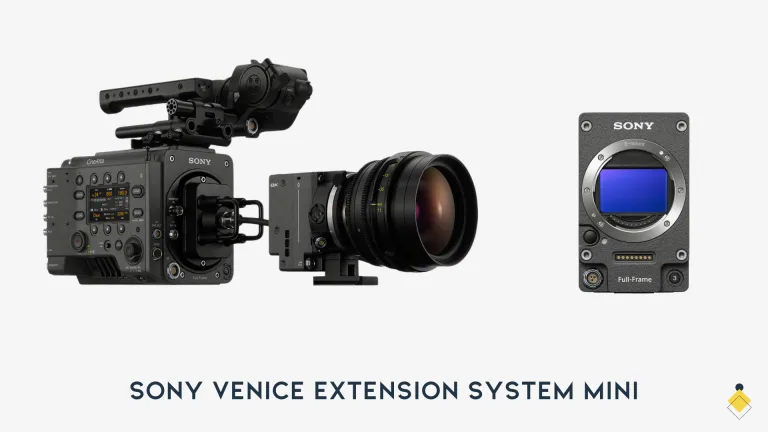
The honest summary is that these are not decided on charts. The VENICE 2 offers a higher-resolution full-frame sensor and its own well-liked color rendering, and the extension system is an operational advantage on tight rigs and gimbals, one that ARRI has no direct answer to. The BURANO, which we reviewed separately sits lower in cost with in-body stabilization and autofocus, which matters enormously on documentary and small-crew work and not at all on a lit stage. Productions pick between these on lens inventory, on which color science the DP and the colorist would rather live in, and on crew familiarity. Where the DP and the colorist already live in one of these pipelines, that familiarity usually decides it.
If the budget is not there
Worth saying, because a lot of people reading a review of a fifty-thousand-euro camera are not buying one. Almost nothing that makes footage look expensive comes from the body. It comes from lenses, lighting, blocking, and a color pipeline you understand. A camera like the FX30 shot with discipline and graded properly will beat an ALEXA 35 used carelessly, and most of the levers that actually improve video quality cost far less than a license for one of these.
Who has tested this camera, and what they measured
Every measurement quoted above traces to one of these.
- Newsshooter, Matthew Allard ACS, May 2023: the most thorough published hands-on review, with DSC Labs Xyla chart work at EI 800, 3200 and 6400, side-by-side comparisons against the AMIRA, and color-checker tests. Note what it predates: the Base license tier, the 2025 price drop and the Xtreme.
- CineD lab test, Gunther Machu, August 2022: the IMATEST dynamic range figures and the rolling shutter timings this article’s measurements section rests on, plus the latitude test.
- Film and Digital Times, July 2025: the Xtreme first look, with per-format frame rates and the upgrade details.
- ARRI’s own documentation, linked at the point each one is quoted: the ALEXA 35 workflow and post guides, the Log C reference, the Textures technical note, How to Grade LogC4 Footage, and the SUP release notes.
- Netflix Partner Help Center: the approved camera list, which is where the approved-format and ARRICORE details come from.
I have not shot on an ALEXA 35. Every statement above about how the image behaves is what one of these tests measured, and each figure links to the test that produced it. What is mine is the post-production reading: the LogC4, Textures and data sections are written from the grading side of this camera’s output.
Where it falls short
The caveats that matter if you are about to spend money:
- It is a legacy model. Still supported, still approved, still excellent, but ARRI has named a successor. That affects resale, and it affects how long you should expect new features to arrive for this body.
- The license model is an operational hazard. Identical-looking cameras have different capabilities. That is a booking error waiting to happen on every job, and the burden falls on whoever writes the order.
- The power standard is a tax. B-mount at 24 V means your existing batteries are irrelevant.
- No ARRICORE, ever. The efficient new codec belongs to the Xtreme.
- Storage and DIT costs are real. No internal media, uncompressed ARRIRAW on the card, and HDE only helping after offload. See the data table.
- The Texture decision is irreversible. It is baked in before the ARRIRAW frame exists, so a grain and sharpness choice made in an hour of prep is a fact about the negative for the life of the show. Nothing else on this camera behaves that way.
- Matching it to older ARRI cameras is a deliberate choice, not a default. ALEV 4 does not render like ALEV 3, and ARRI’s own answer is a Texture: it names K445 Default as the one to use when matching legacy ARRI bodies. Somebody has to get that right in prep, because it is baked in.
- The slow-motion trade-off on the Xtreme is not free, and 11 stops at EI 1600 will not intercut invisibly.
The verdict, in three cases
Rent it if you shoot fewer than roughly a hundred days a year on this class of camera, which is most people. The published rental figures make ownership hard to justify, and renting keeps you on whichever body a production needs.
Buy the discounted legacy body if you have the utilisation, you do not need frame rates beyond 120 fps, and the price cut is real where you are buying. The image is identical to the Xtreme’s. You are accepting a weaker resale position in exchange for the same picture for less money.
Take the EUR 15,900 upgrade if you already own one and either high frame rate is part of your work or ARRICORE’s data saving pays for itself in your post workflow. Your licenses come with you.
Frequently asked questions
Can the Compact Drive Express record ARRIRAW?
No. The Compact Drive Express is the cheaper media option and records Apple ProRes only. If your show is shooting ARRIRAW you need standard Codex Compact Drives, and this is worth confirming on the order rather than on the day.
Is the ALEXA 35 Netflix approved?
Yes. Netflix’s approved camera list includes the ALEXA 35 at 4.6K, 4608 by 3164, for ARRIRAW, ProRes 4444 XQ and ProRes 4444, and notes it is approved for anamorphic capture. ProRes 422 HQ is not among the approved formats for this camera, which matters when you plan storage.
Can I change ARRI Textures in post?
No, and this catches people out. Textures are applied before the ARRIRAW frame exists, so they are baked into both ARRIRAW and ProRes. ARRI calls them a destructive feature that cannot be altered afterwards. Shooting raw does not defer the decision, which makes the Texture choice the one irreversible setting on the camera.