CGI stands for computer-generated imagery. It can include modeled objects, environments, animation and other images created with computer graphics. A final shot may combine those images with photographed material.
A simple composite, separated into parts
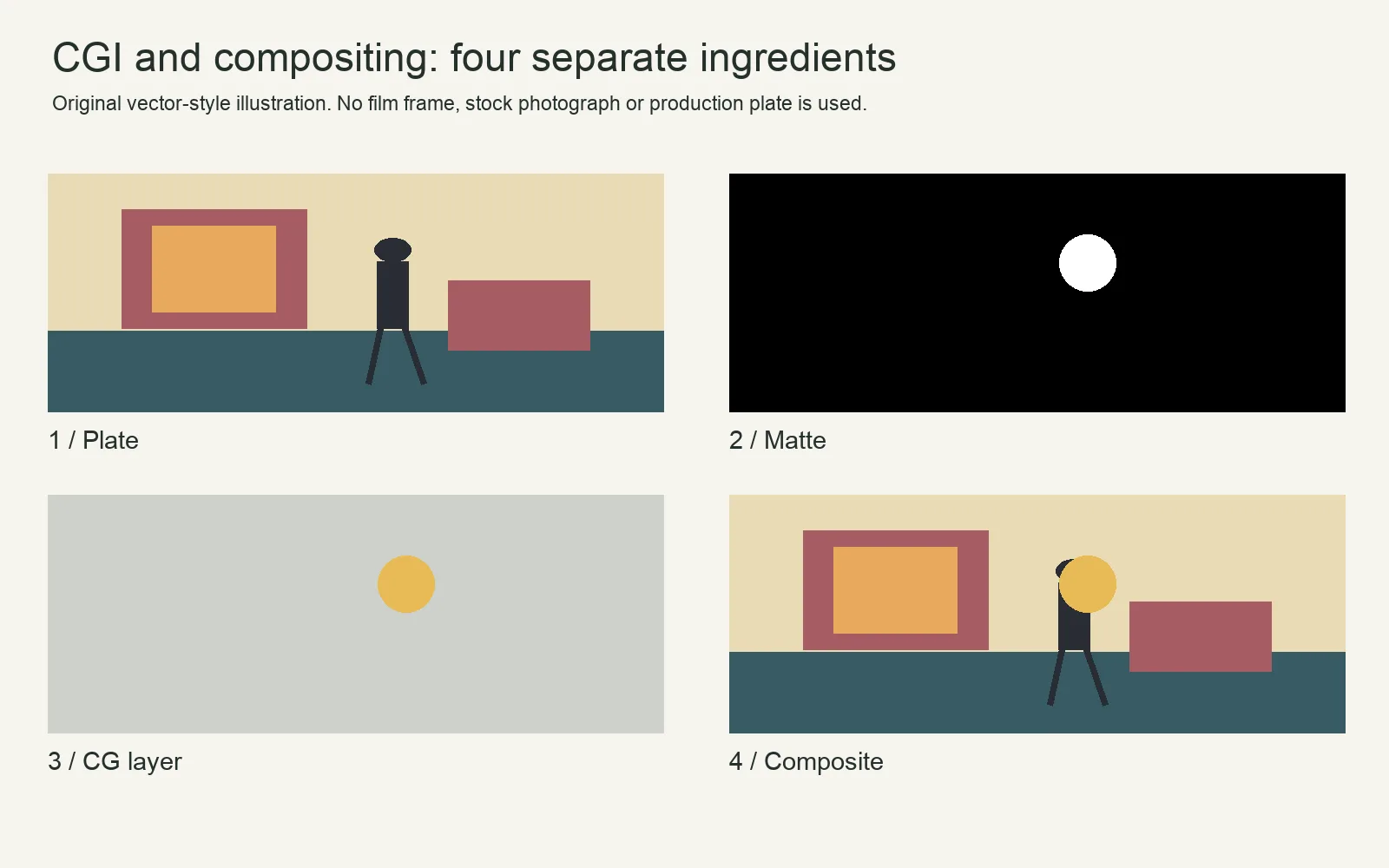
The background supplies the setting. The matte determines where the added object is visible. The object layer supplies its color and shape. Compositing combines them. In a real shot, matching perspective, light, shadow, focus, grain and motion makes the layers belong together.
CGI, VFX, animation and compositing
| Term | Useful distinction |
|---|---|
| CGI | Computer-created imagery, which can be still or moving. |
| Visual effects / VFX | A broader production category for constructing or altering imagery; can combine live action, graphics, miniatures and other methods. |
| Compositing | Combining elements into an image; not every element must be CGI. |
| Animation | Creating change over time; can use CGI, drawings, stop motion or other methods. |
| Virtual production | A set of production workflows connecting physical and virtual elements; not a synonym for every CGI shot. |
| Generative AI imagery | A particular way of generating or modifying images; not interchangeable with all traditional modeling, rendering or VFX. |
From a story need to a finished shot
- Define what the shot must show and what can be captured practically.
- Plan the camera, reference measurements, lighting reference and any tracking or keying requirements.
- Create or acquire the necessary assets with appropriate permissions.
- Animate and render where needed, then composite with the plate.
- Review edges, perspective, contact, reflections, color, focus and motion at the intended output size.
For example, adding a fictional illuminated sign to a room requires more than drawing letters. The sign must fit the perspective, stay attached during camera movement and affect nearby surfaces plausibly if it is meant to emit light. That is an illustrative workflow, not a claim about a documented production.
What CGI can add to a shot
CGI is not limited to creatures or explosions. It can supply a building beyond a photographed set, a product that does not yet exist, a digital double, an animated title or a fully constructed environment. It can also support an unobtrusive change, such as extending a street beyond the part the production could build. The viewer may never notice that the image contains computer-created elements.
A background replacement is not automatically a 3D-CGI task. The replacement might be a photograph, a painted image or a rendered environment. Likewise, removing a microphone from a shot can involve paint and compositing without building a 3D model. Describe the actual work rather than use CGI as a synonym for everything changed in post.
How a 3D image is built
| Stage | What the artist makes or decides | Example: an added shop sign |
|---|---|---|
| Design and layout | The appearance, placement and camera view. | The sign’s size and position on the building. |
| Modeling | The object’s three-dimensional shape. | Letter depth, mounting brackets and the sign housing. |
| Materials and textures | How surfaces look and respond to light. | Paint, metal, dirt and translucent lettering. |
| Rigging and animation | Controls and change over time, when needed. | A swinging sign or a designed flicker; a static sign may need neither a character rig nor complex animation. |
| Lighting | Virtual illumination and its relationship to the scene. | Matching the direction of daylight and the sign’s intended glow. |
| Rendering | Calculating images from the scene, materials, lights and camera. | Frames of the sign with useful transparency or separate output passes. |
| Compositing | Integrating the resulting images with other elements. | Placing the sign into the plate, respecting foreground objects and matching the photography. |
These stages are distinct jobs even when one person performs several of them. Rendering does not automatically solve an incorrect model, and a detailed texture cannot fix a camera angle that does not match. Blender’s rendering introduction describes the conversion of a 3D scene into a 2D image; the surrounding production work establishes what that renderer is being asked to show.
A worked planning example: attach a sign to a moving shot
Imagine a fictional exterior in which the camera moves past an empty shopfront and an illuminated sign must appear above the door. Before recording, decide whether the sign will stay flat to the wall, project into space or cast changing light on a performer. Those choices determine what reference and effects work will be needed.
Before and during the shoot
Agree the sign’s position with the director, camera team and effects artist. Record the camera and lens information and useful measurements of the doorway or wall. Capture reference for the surfaces and lighting. If an actor looks toward the sign, establish the intended eyeline and timing. If its glow must appear on their face, decide whether a practical light can provide that interaction.
A moving camera requires the added object to remain registered to the scene. Depending on the movement and surface, a planar track may be enough; a shot with significant depth changes may need a solved 3D camera. Blender’s tracking documentation distinguishes camera/object tracking and reconstruction tools. A tracker follows image evidence; it is not a substitute for planning visible, stable tracking features.
In post-production
Start with a simple placement test before spending time on surface detail. Check that the sign stays on the wall throughout the move. Add a foreground mask where a passing person or pole should hide it. Match the photographed softness and motion blur, then examine contact, reflection and light spill. An image that looks convincing in a paused frame can slide, flicker or reveal a bad edge in motion.
The teaching breakdown above explains background, matte, object and composite. It does not perform this moving-camera exercise, provide a camera solve or establish how a real illuminated sign would photograph.
Why some CGI looks disconnected from the scene
- Wrong perspective or scale: the object seems to float or change size relative to the set. Check placement and camera matching before polishing textures.
- Missing contact: feet, wheels or supports do not convincingly meet the ground. Check the contact point, shadow and interaction.
- Wrong light: the added element is lit from a direction that the plate does not support, or an emitting object affects nothing around it.
- Unmatched image texture: an exceptionally sharp, noiseless render sits inside softer or grainier photography.
- Unconvincing movement: weight, timing or acceleration contradict what the object should do, even if individual frames are detailed.
These are review questions, not proof that a particular film used a particular technique. A film’s actual breakdown or production account is needed before identifying how one of its shots was made.
Plan the effects workload by shot
Count what changes between shots: camera angle, lighting, interaction, object state and visibility. A reusable asset can save modeling work, but each new shot can still need tracking, lighting, compositing and review. A five-second close-up with hair, glass and moving reflections may be harder to integrate than a longer simple background extension.
For a first exercise, choose one locked camera, one simple object and a scene you can light and measure. Approve placement and motion before increasing render quality. Keep the source plate, project, asset permissions and versioned outputs together so that a later correction does not require rebuilding the shot from memory.
Practical and digital methods can work together
A physical prop can provide interaction and reference while a digital extension changes its surroundings. A miniature can be photographed and then composited. Choose the combination that serves the shot, schedule and available skills; “practical” and “CGI” are not reliable quality rankings.
Historical “first CGI” claims depend on whether the claim means an experiment, a particular effect, a feature film or a fully computer-animated feature. A precise historical comparison therefore needs a clearly defined category and production records.
Continue to green-screen keying for extracting a subject and Sony OCELLUS camera tracking for one documented virtual-production system. The short-film workflow puts these decisions into the production schedule.