A Wes Anderson palette is built across production design, costume, lighting, photography and finishing. A strip of five colors can be a useful study aid, but it cannot describe every scene or reproduce the film’s complete look.
Start with a documented production example
In the ASC’s interview with cinematographer Robert Yeoman, the discussion of The Grand Budapest Hotel describes a department-store location transformed by the art department, with practical lighting and a controlled soft-light approach. That is evidence of coordinated production choices, not proof that a single grading preset created the palette.
| Department / stage | Color decisions to look for |
|---|---|
| Production design | Wall colors, objects, materials, patterns and the size of each colored area. |
| Costume | How a performer separates from or belongs within the setting. |
| Lighting and photography | Source color, contrast, exposure, filtration and how surfaces are recorded. |
| Finishing | Shot matching, tonal separation and the final color relationships. |
An original rose-and-plum interpretation
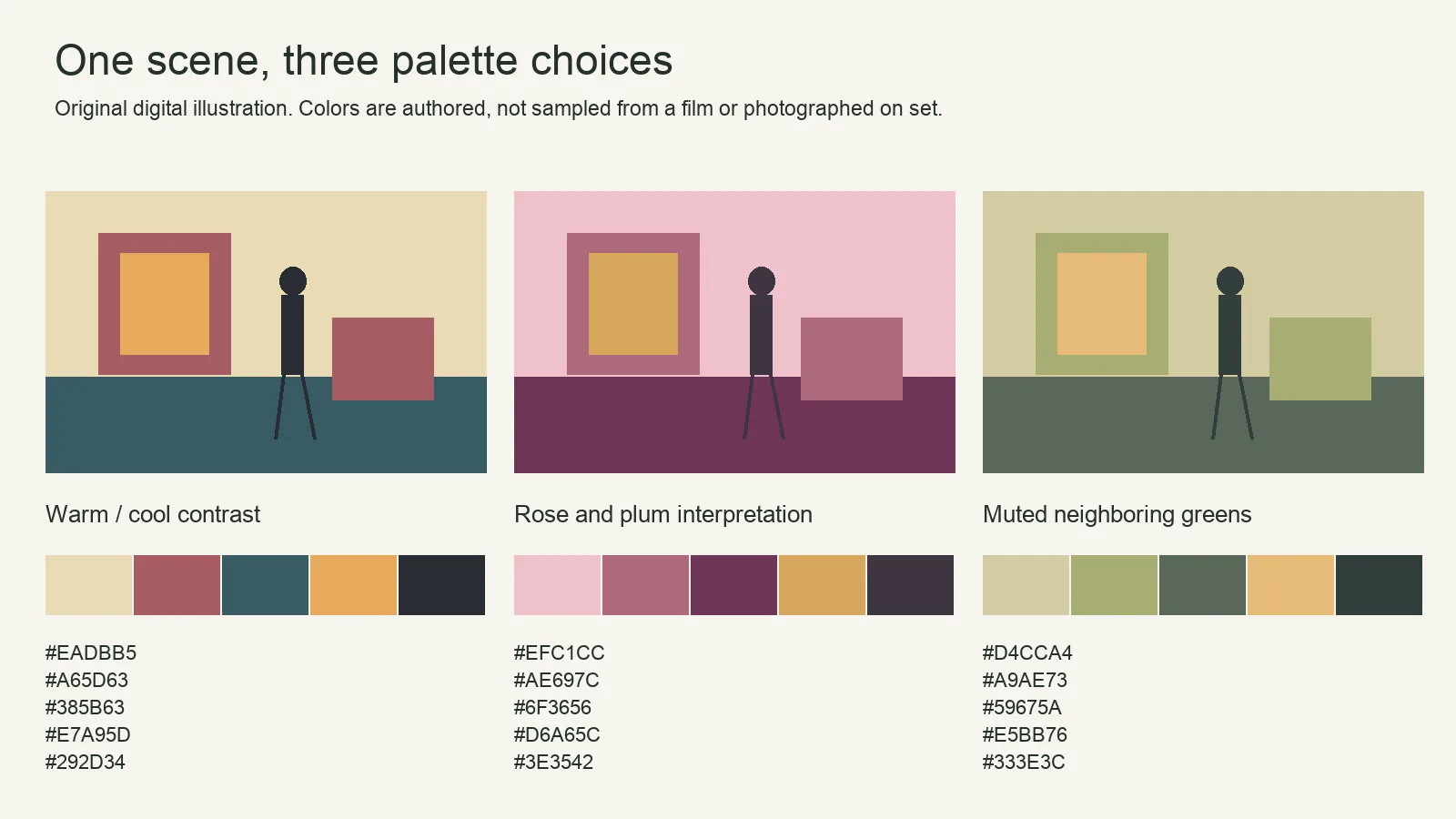
| Role | Authored sRGB HEX |
|---|---|
| Light background | #EFC1CC |
| Supporting rose | #AE697C |
| Plum separation | #6F3656 |
| Warm accent | #D6A65C |
| Dark anchor | #3E3542 |
These values were selected for the illustration. A different distribution of the same five colors would create a different composition. Keep the warm accent small, test the dark anchor against the background, and compare the subject’s visibility before increasing saturation.
How to study a film frame properly
- Identify the film, release/version and exact frame or timestamp.
- Record the source and whether you have permission to reproduce it. Permission to watch a film is not automatically permission to publish a still.
- Use a defined color-managed image workflow and note the source grade and any display conversion.
- Sample meaningful areas rather than claiming a dominant-color algorithm found the film’s official palette.
- Explain what the colors do in that particular scene, alongside staging, performance and adjacent shots.
This revision does not supply rights-cleared sampled film frames. It avoids assigning fixed emotions to pink, yellow or blue and does not present invented swatches as measurements.
Study the distribution of color, not only the swatches
Five swatches give each color the same visual space. A film frame rarely does. One color may cover a wall, another only a hat or an illuminated sign. The small accent can become the first thing a viewer notices because of its location, contrast or relation to the action.
When analyzing a frame, record which colors occupy the largest areas, which separate the subject from the background and which draw attention to a detail. Also compare lightness: two different hues can still merge if their tonal values are similar. A palette that looks varied in a strip may produce an unreadable figure in the scene.
Separate paint color from photographed color
A costume or wall does not have one fixed screen value. Its recorded appearance depends on illumination, exposure, reflectance, the camera’s interpretation and the finishing pipeline. Glossy and matte surfaces of a similar nominal color can react differently to the same light. Shadows and highlights create a range of values within one object.
Yeoman’s first-person account of The Grand Budapest Hotel describes the art department transforming the location and the photographic team creating soft illumination alongside practical lights. That documented collaboration is a useful model: decide the surfaces and lighting together instead of expecting a finishing adjustment to invent the whole palette.
Apply the authored palette to a small original scene
Use the rose-and-plum values above as a design exercise, not as an official recipe. Imagine a person waiting at a ticket counter. Assign the light rose to a large background area, the supporting rose to a nearby object, plum to the performer’s clothing and the warm accent to one ticket or lamp. Keep the dark anchor available for a small area that gives the image tonal structure.
- Make a neutral arrangement first. Establish the subject’s position and the action the viewer must understand.
- Choose the dominant area. Put the background color on a substantial surface rather than spreading every color equally.
- Separate the performer. Compare the clothing against the actual lit background. If the figure disappears, change lightness, placement or material before increasing saturation everywhere.
- Place one accent deliberately. Decide whether it should guide attention to the face, an object or the exit.
- Test the reverse and close view. A color relationship that works in the wide may disappear when most of the background leaves the frame.
This is an original planning example. No photograph, film still or measured scene test is supplied for it.
Match first, then refine the look
Start finishing with correct input interpretation and a consistent viewing transform. Balance unwanted exposure or white-balance differences between angles before evaluating the creative palette. Otherwise, an accidental green shift in one shot can be mistaken for an intentional color relationship.
Make restrained comparisons: the same frame with a brighter background, a less saturated accent or a darker costume. Keep the original next to the variants and review at the intended viewing size. A global hue change may alter skin, signage and other important colors along with the surface you wanted to change.
When a palette study is not working
Everything competes: reduce the number or area of accents. The subject disappears: inspect lightness and background placement. The image feels flat: consider lighting and material separation rather than adding saturation alone. The shots do not belong together: compare neighboring frames through the same color pipeline and identify which relationship changed.
Symmetry, staging, lenses, movement, costume and performance also contribute to a film’s visual identity. A successful color exercise can teach a useful relationship without reproducing an entire filmmaker’s style.
Apply the relationship to your own scene
Choose a location and clothing that already support the intended colors. Photograph or illustrate a neutral version, then alter one component at a time: background, subject color, light and grade. Save the original and compare at the same output size. This reveals whether the palette is working before you search for a finishing preset.
Use the image-palette workflow to record selected colors and the color-theory guide to compare complementary and neighboring relationships. The cinematographer role guide explains where these decisions fit within a production team.